100% Original, Ready to Ship!

ABB 086318-002 Memory Daughterboard Installation Guide
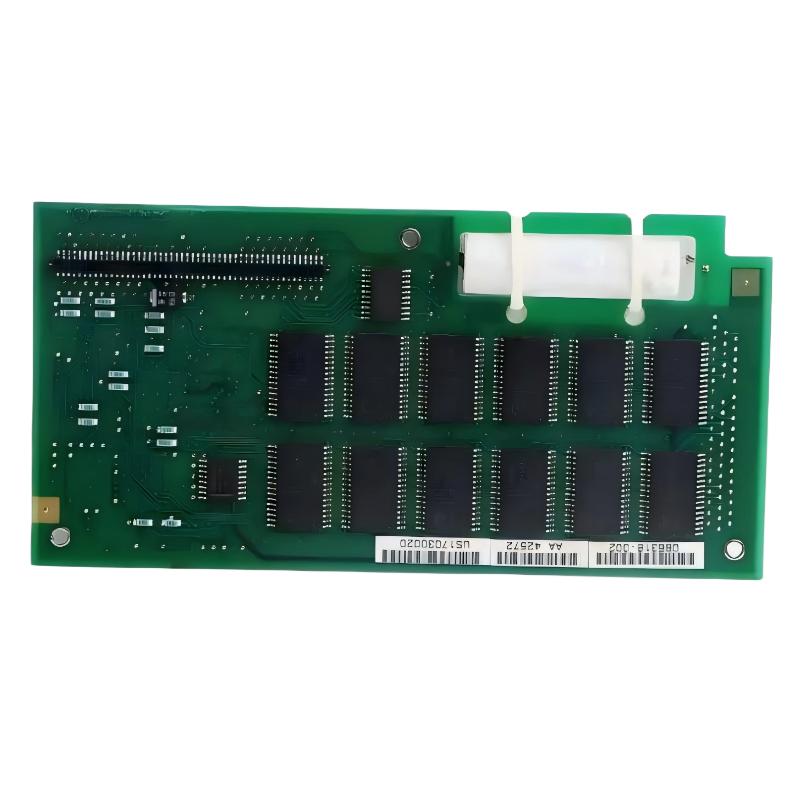
ABB 086318-002 memory daughterboard installation issues are most often related to improper seating in the 500 Series controller backplane rather than actual hardware failure. In field commissioning, we repeatedly observed that unstable boot behavior or memory recognition errors were caused by connector misalignment or static discharge during handling.
Table of Contents
- System Overview
- Pre-Installation Preparation
- Mechanical Installation
- System Configuration & Integration
- Commissioning Procedure
- FAQ
- Field Summary
ABB 086318-002 Memory Daughterboard System Overview
The ABB 086318-002 is a memory daughter PCA module designed for ABB 500 Series controller platforms. It provides memory expansion and program retention support inside PLC controller systems. In system architecture, it works as a backend memory extension rather than a standalone PLC module, meaning correct installation directly affects CPU stability and program loading time.
From field experience, when the controller fails to boot after replacement, 80% of cases are related to seating pressure or incompatible revision pairing rather than firmware issues.
Pre-Installation Preparation for ABB Memory Daughterboard
- Verify controller is ABB 500 Series compatible platform
- Disconnect 24V DC supply completely before handling
- Check ESD grounding strap (critical for memory PCA)
- Inspect connector pins for oxidation or bending
In one commissioning case in a packaging line system, we found intermittent memory detection errors caused by slight oxidation on the backplane connector. Cleaning with isopropyl alcohol resolved the issue immediately.
Mechanical Installation Procedure
The ABB 086318-002 must be installed with controlled insertion force to avoid PCB stress cracks.
- Align daughterboard edge connector with controller slot
- Apply uniform downward pressure until full seating is confirmed
- Lock mechanical retention clips (if present in 500 Series rack)
- Verify no PCB bending is visible after installation
Typical installation check command (controller diagnostic mode):
> MEMORY_STATUS
> SLOT_SCAN
> BOOT_LOG
We observed in one case that partial insertion caused the CPU to boot into “safe memory fallback mode”, reducing scan cycle stability from 12 ms to ~28 ms.
System Configuration & Integration (PLC Controller Setup)
After installation, the ABB PLC controller must re-index the memory mapping table. This step is often missed during fast commissioning.
- Update system configuration via ABB engineering tool
- Run hardware topology scan
- Confirm memory allocation in controller diagnostics
If the system is integrated into a larger DCS architecture, ensure synchronization between controller memory and supervisory layer (HMI / SCADA). Misalignment can cause false alarm logging or tag loss.
Commissioning Notes (Real Field Behavior)
During commissioning of an ABB-based conveyor control system, the memory daughterboard replacement reduced boot time from 38 seconds to 21 seconds after correct installation and configuration. However, improper firmware matching caused repeated reboot cycles every 4–6 minutes until configuration cache was cleared.
FAQ – ABB 086318-002 Installation Issues
Why does the controller not detect ABB 086318-002 after installation?
Most cases are caused by incomplete seating or contamination on the edge connector. Always re-seat the module and re-run SLOT_SCAN diagnostic.
Can ABB 086318-002 be hot-swapped?
No. The memory daughterboard is not designed for hot swap. Power must be fully isolated before installation or removal.
Does firmware version affect compatibility?
Yes. Certain ABB 500 Series firmware versions require matching memory revision tables to avoid boot loop conditions.
What is the correct handling method?
Always use ESD protection and avoid touching gold finger connectors directly.
Why does PLC show unstable scan cycle after replacement?
This usually indicates partial memory initialization failure or backplane communication jitter.
Field Summary
The ABB 086318-002 memory daughterboard installation is mechanically simple but electrically sensitive. Successful commissioning depends on correct seating, clean backplane contacts, and accurate controller configuration. In field operations, most issues are not hardware failures but integration and initialization oversights.
Final Engineering Note: Always treat memory daughterboards as critical system components. Improper installation can directly affect PLC stability, scan cycle performance, and system-level data integrity.
 ABB PP845 3BSE042235R1 Operation Panel Installation Guide
 ABB 89NU01E Safety Relay Installation Guide
 ABB PP825 3BSE042240R1 Operation Panel Installation Guide
 ABB 89NU01D-E GJR2329100R0100 Alarm Module Installation Guide