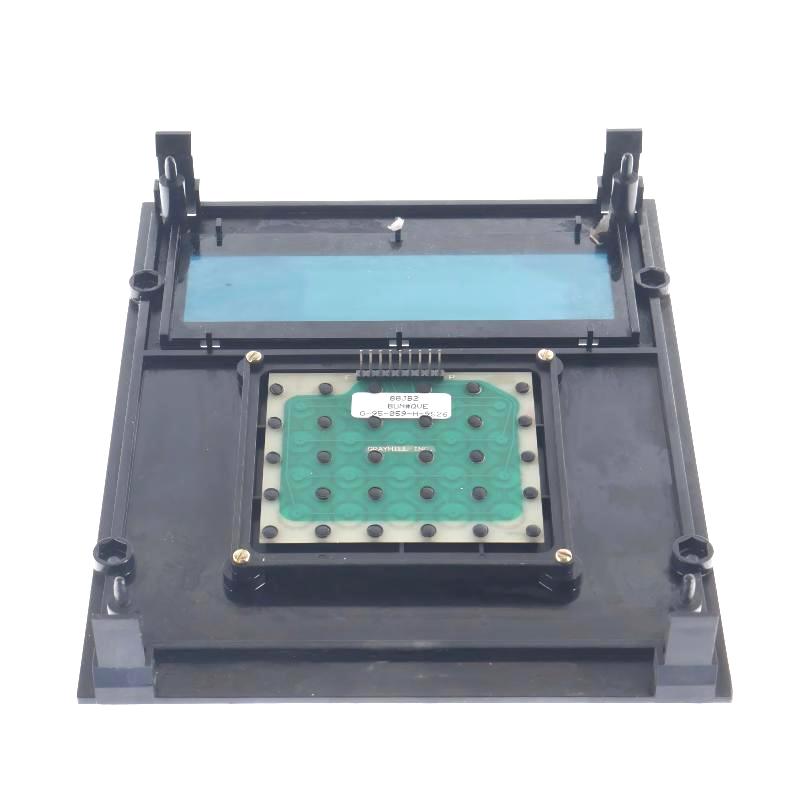
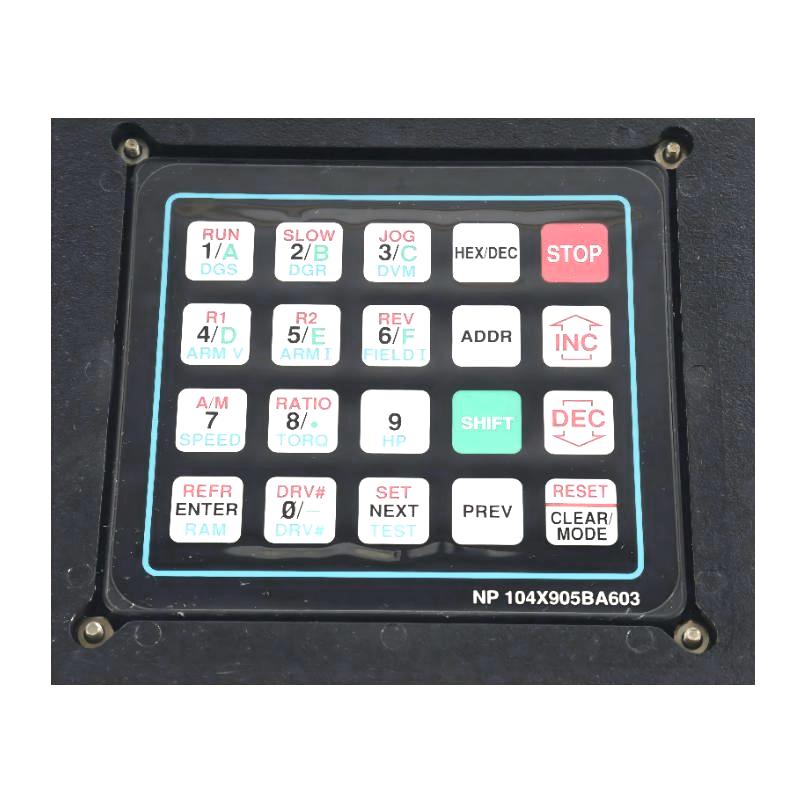
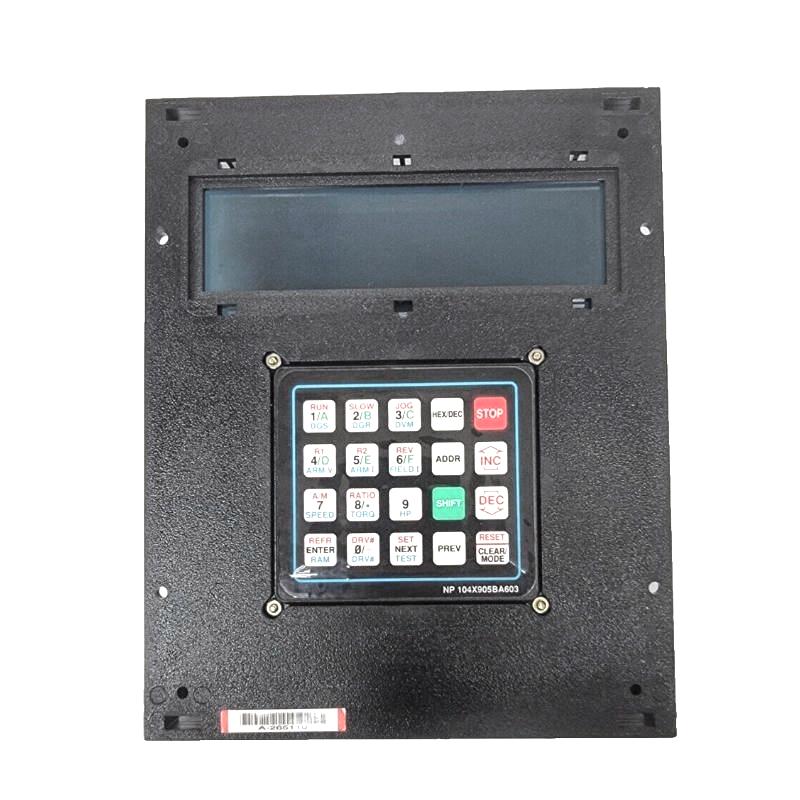
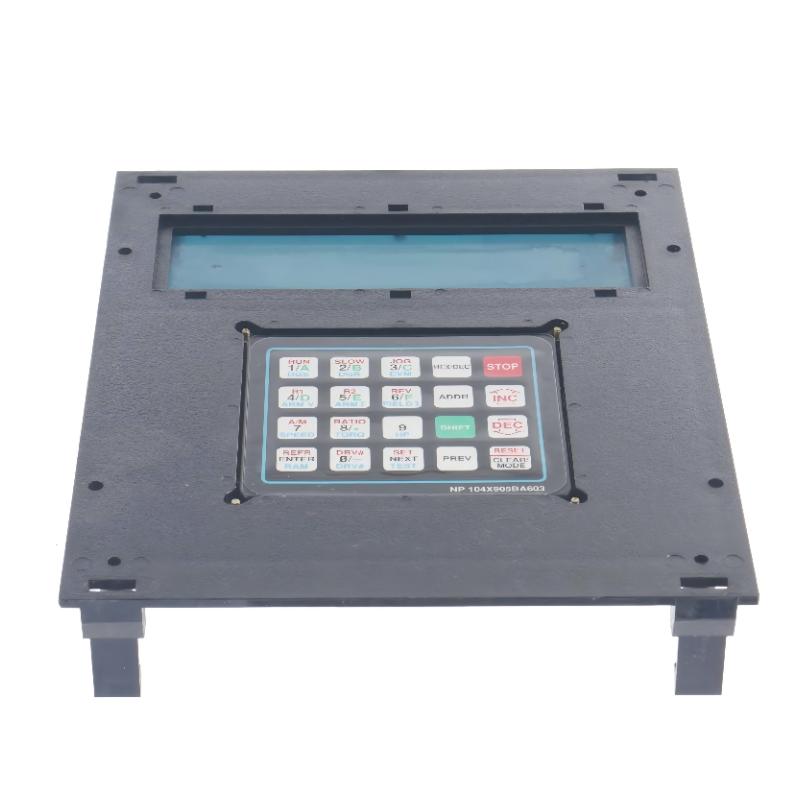
GE 104X905BA603 Display Panel With Keyboard
| Company Information | ||||||||
| [email protected] | ||||||||
| Mobile | +8613666084105 | |||||||
| +8613666084105 | ||||||||
| 15305023276 | ||||||||
| Add to | Room 1004, No. 62 Xiangxiu Li, Siming District, Xiamen City, Fujian Province, China | |||||||
 Technical Specifications
| Parameter | Specification |
|---|---|
| Product Name | GE Display Panel With Keyboard |
| Model | 104X905BA603 |
| Manufacturer | GE |
| Product Type | Display Panel with Integrated Keyboard |
| Display Type | Industrial Operator Display Panel |
| Keyboard Type | Integrated Industrial Membrane Keyboard |
| User Interface | Display Screen with Multi-Key Operation |
| Mounting Method | Panel Mounting |
| Input Method | Keypad Operation |
| Communication Interface | Industrial Control System Interface |
| Power Supply | Industrial DC Power Supply |
| Protection Level | Suitable for Industrial Control Environments |
| Operating Environment | Designed for Continuous Industrial Operation |
| Typical Applications | Turbine Control Systems, Industrial Automation, Process Control, Power Generation, and Factory Control Systems |
| Dimensions | 180 × 120 × 40 mm |
| Weight | 0.118 kg |
FAQ
1. What is the primary function of the GE 104X905BA603 Display Panel With Keyboard?
The GE 104X905BA603 Display Panel With Keyboard is an industrial operator interface designed to provide local monitoring and control of automation equipment. It combines a display panel with an integrated industrial keyboard, allowing operators to view system status, monitor process parameters, acknowledge alarms, modify operating settings, and execute control commands directly from the control panel. The unit is commonly installed in industrial control cabinets where reliable human-machine interaction is required for daily operation and maintenance.
2. Which systems is the 104X905BA603 compatible with?
The 104X905BA603 is designed for use with compatible GE industrial automation and control systems. It is commonly integrated into turbine control systems, power generation equipment, process automation platforms, and other industrial control applications requiring a dedicated operator interface. Depending on the system configuration, the display panel communicates with the main controller to provide real-time operational information and allow authorized user interaction. Proper compatibility should always be confirmed according to the control system configuration and project requirements.
3. What should be considered during installation?
The display panel should be mounted securely in a properly sized panel cutout to ensure mechanical stability during continuous operation. Adequate ventilation should be provided around the unit to prevent excessive heat buildup inside the control cabinet. Power and communication cables should be routed separately from high-voltage wiring to minimize electromagnetic interference. Before powering up the equipment, all wiring connections should be carefully verified, and the panel should be inspected to ensure the keyboard and display are free from physical damage. Correct installation helps maintain reliable performance throughout the service life of the equipment.
4. Why might the display panel fail to communicate with the control system?
Communication failures may result from loose communication cables, damaged connectors, incorrect interface configuration, controller communication faults, or power supply issues. Electromagnetic interference generated by nearby high-power equipment may also affect communication quality. Troubleshooting should begin by checking cable integrity, connector condition, communication parameter settings, controller diagnostics, and system power status. In many cases, restoring proper communication settings or replacing damaged cables resolves the problem without replacing the display panel itself.
5. What should be done if the keyboard becomes unresponsive?
If the integrated keyboard does not respond, the first step is to verify that the display panel is receiving the correct power supply and has completed its startup sequence. The keypad surface should be inspected for contamination, mechanical damage, or excessive wear that may prevent normal key operation. Internal communication between the keyboard and display controller should also be checked if supported by the maintenance procedure. If only specific keys fail while others continue to operate normally, the keypad assembly may require inspection or replacement. Regular preventive maintenance helps reduce the likelihood of keypad-related issues.
6. Is the GE 104X905BA603 suitable for continuous industrial operation?
Yes. The 104X905BA603 is designed specifically for continuous operation in industrial automation environments. Its rugged construction enables reliable performance under the demanding conditions commonly found in power plants, manufacturing facilities, and process industries. When installed in accordance with GE recommendations and operated within the specified environmental conditions, the display panel provides dependable long-term service with minimal maintenance, making it suitable for critical operator interface applications.
7. What maintenance is recommended for the display panel?
Routine maintenance includes periodically cleaning the display surface and keyboard using approved cleaning materials, checking panel mounting hardware, inspecting communication and power connections, and verifying proper display operation. Maintenance personnel should also inspect the control cabinet for excessive dust, moisture, or vibration that could affect long-term reliability. Reviewing system alarm logs and confirming that all keyboard functions operate correctly during scheduled maintenance can help identify potential issues before they lead to operational interruptions.
8. What are the advantages of using the GE 104X905BA603 Display Panel With Keyboard in industrial applications?
The GE 104X905BA603 provides a reliable and efficient operator interface by integrating a display and industrial keyboard into a single compact unit. It enables operators to monitor equipment status, adjust operating parameters, acknowledge alarms, and perform system diagnostics directly from the control cabinet. Its industrial-grade construction, stable performance, user-friendly operation, and compatibility with GE automation systems make it well suited for demanding applications in power generation, process control, and factory automation. By providing clear local access to critical system information, it helps improve operational efficiency, reduce troubleshooting time, and enhance overall system reliability.
GE 104X905BA603 Display Panel With Keyboard is in stock. Please contact us for a quick quote and competitive pricing.
| Company Information | ||||||||
| [email protected] | ||||||||
| Mobile | +8613666084105 | |||||||
| +8613666084105 | ||||||||
| 13950166376 | ||||||||
| Add to | Room 1004, No. 62 Xiangxiu Li, Siming District, Xiamen City, Fujian Province, China | |||||||
Company Introduction
Xiamen Shengruite Trading Co., Ltd. is a company specializing in the supply of industrial PLC spare parts.
We provide high-quality PLC spare parts to customers in the global manufacturing, energy and power, chemical and other fields.
Since its establishment in 2011, after 13 years of rapid development, the cumulative global shipments have reached 223,650 pieces, with an annual output value of US$50 million.
Successfully served more than 500 customers in more than 100 countries and regions including Saudi Arabia, UAE, the United States, Europe, Africa, and Southeast Asia
Our Mission
Provide customers with the best quality PLC spare parts and the fastest delivery service to ensure that their industrial automation systems are always in the best operating condition.
We provide a 1-year warranty service, and we support returns and exchanges for any issues to ensure your rights and interests are fully protected.
We can provide detailed product images upon request, and our team can arrange warehouse photos for confirmation to ensure you have all the information you need before making a purchase.
Shipping times vary depending on your location. With the support of our 16 global warehouses, we strive to deliver orders as quickly as possible. Contact us to get an estimated delivery time for your specific location.
The minimum order quantity (MOQ) is typically one unit. However, for larger orders, please contact us for potential discounts and pricing details.
Yes, we offer competitive pricing for bulk purchases. Please reach out to our sales team with the specifics of your order to receive a custom quote.
We accept various payment methods for wholesale orders, including bank transfers (T/T), letters of credit, and other options upon agreement. For large transactions, please contact us directly for payment terms.
Yes, we offer flexible ordering options for both small and large quantities. Whether youre looking for a single unit or a large batch, we can accommodate your needs.
We occasionally offer promotional discounts for new wholesale customers. Contact us to learn more about any current offers available for first-time buyers.
If you are unsure of compatibility with your existing setup please provide your system details and our support team can verify compatibility prior to purchase.
Returns are accepted within 30 days if the product is unused, unopened, and in its original packaging. Please note that return shipping and associated costs are the buyer\\\\\\\\\\\\\\\\\\\\\\\\\\\\\\\\\\\\\\\\\\\\\\\\\\\\\\\\\\\\\\\\\\\\\\\\\\\\\\\\\\\\\\\\\\\\\\\\\\\\\\\\\\\\\\\\\\\\\\\\\\\\\\\\\\\\\\\\\\\\\\\\\\\\\\\\\\\\\\\\\\\\\\\\\\\\\\\\\\\\\\\\\\\\\\\\\\\\\\\\\\\\\\\\\\\\\\\\\\\\\\\\\\\\\\\\\\\\\\\\\\\\\\\\\\\\\\\\\\\\\\\\\\\\\\\\\\\\\\\\\\\\\\\\\\\\\\\\\\\\\\\\\\\\\\\\\\\\\\\\\\\\\\\\\\\\\\\\\\\\\\\\\\\\\\\\\\\\\\\\\\\\\\\\\\\\\\\\\\\\\\\\\\\\\\\\\\\\\\\\\\\\\\\\\\\\\\\\\\\\\\\\\\\\\\\\\\\\\\\\\\\\\\\\\\\\\\\\\\\\\\\\\\\\\\\\\\\\\\\\\\\\\\\\\\\\\\\\\\\\\\\\\\\\\\\\\\\\\\\\\\\\\\\\\\\\\\\\\\\\\\\\\\\\\\\\\\\\\\\\\\\\\\\\\\\\\\\\\\\\\\\\\\\\\\\\\\\\\\\\\\\\\\\\\\\\\\\\\\\\\\\\\\\\\\\\\\\\\\\\\\\\\\\\\\\\\\\\\\\\\\\\\\\\\\\\\\\\\\\\\\\\\\\\\\\\\\\\\\\\\\\\\\\\\\\\\\\\\\\\\\\\\\\\\\\\\\\\\\\\\\\\\\\\\\\\\\\\\\\\\\\\\\\\\\\\\\\\\\\\\\\\\\\\\\\\\\\\\\\\\\\\\\\\\\\\\\\\\\\\\\\\\\\\\\\\\\\\\\\\\\\\\\\\\\\\\\\\\\\\\\\\\\\\\\\\\\\\\\\\\\\\\\\\\\\\\\\\\\\\\\\\\\\\\\\\\\\\\\\\\\\\\\\\\\\\\\\\\\\\\\\\\\\\\\\\\\\\\\\\\\\\\\\\\\\\\\\\\\\\\\\\\\\\\\\\\\\\\\\\\\\\\\\\\\\\\\\\\\\\\\\\\\\\\\\\\\\\\\\\\\\\\\\\\\\\\\\\\\\\\\\\\\\\\\\\\\\\\\\\\\\\\\\\\\\\\\\\\\\\\\\\\\\\\\\\\\\\\\\\\\\\\\\\\\\\\\\\\\\\\\\\\\\\\\\\\\\\\\\\\\\\\\\\\\\\\\\\\\\\\\\\\\\\\\\\\\\\\\\\\\\\\\\\\\\\\\\\\\\\\\\\\\\\\\\\\\\\\\\\\\\\\\\\\\\\\\\\\\\\\\\\\\\\\\\\\\\\\\\\\\\\\\\\\\\\\\\\\\\\\\\\\\\\\\\\\\\\\\\\\\\\\\\\\\\\\\\\\\\\\\\\\\\\\\\\\\\\\\\\\\\\\\\\\\\\\\\\\\\\\\\\\\\\\\\\\\\\\\\\\\\\\\\\\\\\\\\\\\\\\\\\\\\\\\\\\\\\\\\\\\\\\\\\\\\\\\\\\\\\\\\\\\\\\\\\\\\\\\\\\\\\\\\\\\\\\\\\\\\\\\\\\\\\\\\\\\\\\\\\\\\\\\\\\\\\\\\\\\\\\\\\\\\\\\\\\\\\\\\\\\\\\\\\\\\\\\\\\\\\\\\\\\\\\\\\\\\\\\\\\\\\\\\\\\\\\\\\\\\\\\\\\\\\\\\\\\\\\\\\\\\\\\\\\\\\\\\\\\\\\\\\\\\\\\\\\\\\\\\\\\\\\\\\\\\\\\\\\\\\\\\\\\\\\\\\\\\\\\\\\\\\\\\\\\\\\\\\\\\\\\\\\\\\\\\\\\\\\\\\\\\\\\\\\\\\\\\\\\\\\\\\\\\\\\\\\\\\\\\\\\\\\\\\\\\\\\\\\\\\\\\\\\\\\\\\\\\\\\\\\\\\\\\\\\\\\\\\\\\\\\\\\\\\\\\\\\\\\\\\\\\\\\\\\\\\\\\\\\\\\\\\\\\\\\\\\\\\\\\\\\\\\\\\\\\\\\\\\\\\\\\\\\\\\\\\\\\\\\\\\\\\\\\\\\\\\\\\\\\\\\\\\\\\\\\\\\\\\\\\\\\\\\\\\\\\\\\\\\\\\\\\\\\\\\\\\\\\\\\\\\\\\\\’s responsibility.
Yes, we offer technical support for the installation and integration of our products. Our team can assist with setup, configuration, and troubleshooting to ensure a smooth installation.