
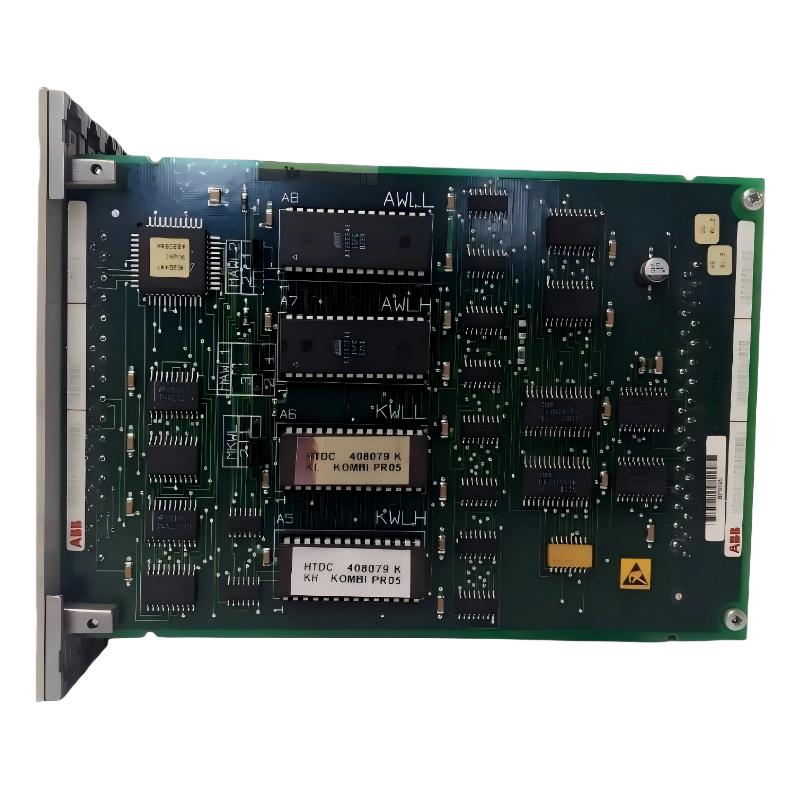
ABB 70PR05B-ES Programmable Processor Installation Guide Overview
ABB 70PR05B-ES HESG332204R0001 installation problems are more often related to incorrect system configuration, rack connections, power conditions, or communication interfaces than to the processor itself. The 70PR05B-ES is identified as a programmable processor for the ABB Procontrol P13 system, so commissioning should be performed as part of the complete control architecture rather than as an isolated PLC Controller replacement.
ABB 70PR05B-ES Installation Preparation
Before inserting the HESG332204R0001 processor into a Procontrol P13 system, confirm the exact part number, revision, rack position, associated communication modules, power arrangement, and existing application configuration. Do not treat a replacement processor as a plug-and-play PLC Controller without checking the surrounding system.
- Confirm the marking: 70PR05B-ES / HESG332204R0001.
- Verify the intended Procontrol P13 rack and slot position.
- Record the existing processor status and diagnostic indications before removal.
- Back up the current control application and available configuration data.
- Inspect rack connectors for oxidation, contamination, or bent contacts.
- Verify the approved power supply and grounding arrangement.
Why System Configuration Matters for ABB 70PR05B-ES
The processor interacts with other Procontrol P13 components. A processor that powers up correctly can still fail commissioning if its expected communication path, application configuration, or connected modules do not correspond to the installed system.
ABB HESG332204R0001 Hardware Inspection Before Installation
A visual inspection should be performed before electrical installation. Examine the PCB area for contamination, loose hardware, signs of overheating, damaged connectors, and mechanical deformation. If the processor has been stored for an extended period, inspect the connector surfaces particularly carefully.
- Compare the nameplate with the maintenance documentation.
- Check the connector and guide mechanism for mechanical damage.
- Inspect adjacent rack modules before installing the processor.
- Confirm that no foreign material is present inside the rack.
- Document the initial condition with photographs for maintenance records.
ABB 70PR05B-ES Wiring and Interface Checks
The 70PR05B-ES should be installed with the same interface arrangement defined by the existing Procontrol P13 engineering documentation. Avoid changing field wiring simply because a processor has been replaced. The objective during an Installation Guide procedure is to reproduce the known-good system configuration first.
Before energizing the rack, verify power polarity, connector seating, rack continuity, grounding, and communication connections. If an interface is shared with another Module, check both ends rather than testing only the processor side.
ABB 70PR05B-ES Electrical Verification
- Measure the supply voltage at the approved test point.
- Check that the voltage remains stable during startup.
- Verify protective earth and cabinet grounding.
- Check communication cable routing and shielding.
- Keep high-energy switching conductors separated from sensitive communication wiring.
ABB 70PR05B-ES System Configuration and Application Setup
Setup should begin with the known system configuration rather than changing parameters experimentally. Compare the replacement processor environment with the previous operating configuration, including application program data, communication assignments, rack topology, and connected Modules.
For a controlled replacement, maintenance engineers should record the following before commissioning:
- Existing diagnostic status
- Processor operating state
- Communication status
- Rack and module arrangement
- Application or control-program version
- Relevant alarm conditions
ABB 70PR05B-ES Setup and Commissioning Procedure
The commissioning sequence should be based on observation rather than assumptions. After installation, energize the system under the approved plant procedure and observe processor status indications before attempting process operation.
- Apply power and allow the processor to complete its startup sequence.
- Check processor diagnostic indications.
- Confirm that expected rack communication becomes available.
- Verify communication with associated control Modules.
- Check application execution status.
- Confirm that process values remain within expected engineering ranges.
- Perform controlled functional tests before returning the equipment to automatic operation.
DIAGNOSTIC LOG
Processor: 70PR05B-ES
Part No.: HESG332204R0001
Power Status: NORMAL
Rack Communication: CHECK
Application Status: CHECK
Module Status: CHECK
Process I/O: VALIDATE
Alarm State: RECORD
Field Commissioning Observation for ABB 70PR05B-ES
In practical processor replacement work, a useful diagnostic sequence is to separate power faults from configuration faults. For example, if the processor powers up normally but an associated Module remains unavailable, replacing the processor again is usually premature. Engineers should first verify rack seating, communication continuity, configuration compatibility, and the status of the associated module.
ABB 70PR05B-ES Commissioning Validation and Signal Checks
Final validation should confirm both processor health and control-system behavior. A processor may appear operational while an incorrect System Configuration prevents reliable process control.
- Verify stable processor operation.
- Confirm expected communication status.
- Check representative digital and analog process signals.
- Compare live values with the previous maintenance baseline.
- Check alarm generation and acknowledgement behavior.
- Perform controlled transition from manual to automatic operation.
ABB 70PR05B-ES Programmable Processor Installation FAQ
What system is the ABB 70PR05B-ES HESG332204R0001 associated with?
The 70PR05B-ES HESG332204R0001 is identified as a programmable processor used within the ABB Procontrol P13 control-system family. Installation should therefore be considered within the complete Procontrol architecture.
Should the application configuration be checked before replacing the processor?
Yes. The existing application and System Configuration should be documented before replacement so that the maintenance team can distinguish a processor problem from a configuration or communication problem.
What should be checked if the processor powers up but communication does not start?
Check rack seating, connector condition, communication wiring, associated Modules, configuration compatibility, and diagnostic indications before assuming processor hardware failure.
Why should grounding be checked during ABB 70PR05B-ES commissioning?
Incorrect grounding can contribute to communication instability, electrical noise, and intermittent control-system behavior. Grounding should therefore be verified as part of commissioning rather than only after a fault occurs.
Can a replacement 70PR05B-ES be commissioned without checking adjacent modules?
It is not recommended. The processor operates as part of a larger control architecture, so adjacent rack Modules and communication interfaces should be checked before concluding that the processor itself is defective.
What information should be recorded during commissioning?
Record processor identification, diagnostic status, supply measurements, rack communication status, application status, associated Module status, alarms, and representative process signals.
How can an engineer distinguish a configuration problem from a hardware problem?
A useful approach is to establish whether power and basic processor diagnostics are normal first. If hardware status is normal but expected Modules or communications remain unavailable, configuration and interface checks should precede hardware replacement.
What is the most important commissioning principle for this programmable processor?
Restore the documented known-good System Configuration first, then validate individual functions. Changing several parameters simultaneously makes Fault Diagnosis considerably more difficult.
ABB 70PR05B-ES General Installation Notes
The ABB 70PR05B-ES HESG332204R0001 Installation Guide should be treated as an engineering verification process rather than a simple module insertion procedure. Correct identification, rack inspection, power verification, communication checks, System Configuration, controlled startup, and signal validation provide a practical path to reliable Setup and Commissioning. For legacy Procontrol P13 installations, preserving the existing configuration and maintenance baseline is particularly important because it allows engineers to identify whether an abnormal condition originates from the processor, the rack, communication path, or another Module.



