100% Original, Ready to Ship!

ABB PM591 1SAP150100R0100 CPU Board Installation Guide
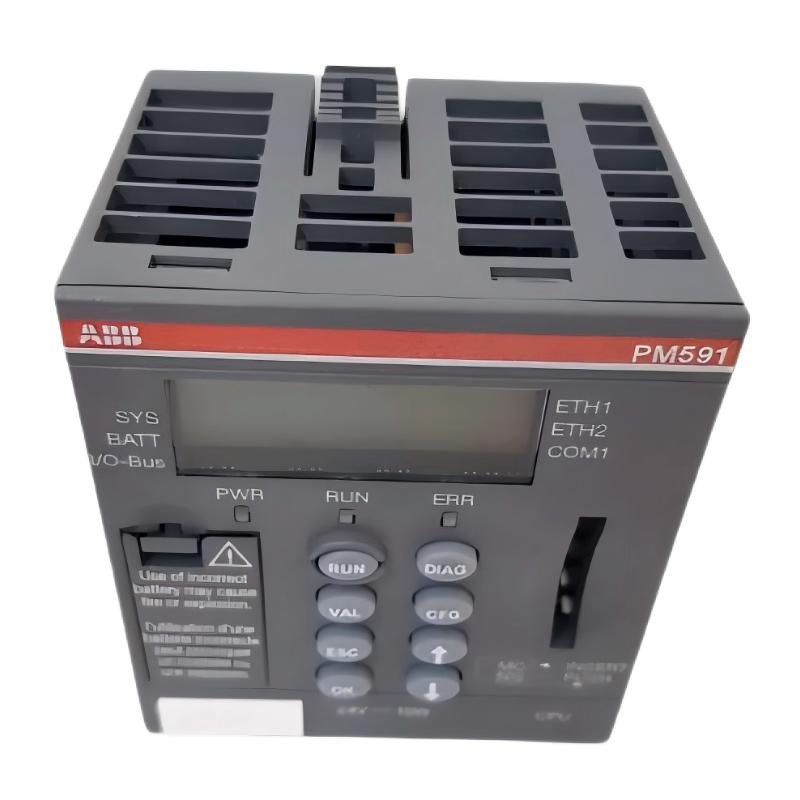
The ABB PM591 CPU Board (1SAP150100R0100) requires correct terminal-base compatibility, a stable 24 V DC supply, and verified communication settings before it can be released for PLC operation. This Installation Guide explains how to prepare the AC500 controller, mount the CPU, check the serial interfaces, and complete Setup and Commissioning without introducing avoidable startup faults.
ABB PM591 CPU Board Installation Guide: Contents
- PM591 CPU Board role and hardware identification
- Installation preparation and compatibility checks
- CPU mounting and electrical connections
- PLC System Configuration and communication setup
- Commissioning and functional validation
- Field commissioning example
- Frequently asked questions
- Installation conclusion
ABB PM591 1SAP150100R0100 CPU Board: Hardware Role
The PM591 is a CPU module in ABB’s AC500 PLC family. The 1SAP150100R0100 version is specified as a 4 MB processor with a 24 V DC supply, a memory-card slot, two RS-232/485 serial interfaces, an FBP interface, and a display. It should not be confused with PM591-ETH or PM591-2ETH variants, which have different hardware configurations.
During an upgrade or replacement, confirm the complete order number printed on the module. A similar front-panel appearance does not guarantee identical interfaces, firmware compatibility, or terminal-base requirements.
ABB PM591 PLC Installation: Preparation and Compatibility
Before installing the CPU Board, check the controller documentation and the existing AC500 hardware configuration. The terminal base determines the physical connection arrangement, so verify that the base is approved for the exact PM591 variant.
- Confirm the part number is 1SAP150100R0100.
- Verify the terminal base and any installed communication modules against the applicable ABB hardware manual.
- Back up the PLC application, hardware configuration, communication parameters, and available diagnostics.
- Record the original status indications and machine operating state.
- Check the cabinet temperature, grounding, wiring condition, and available 24 V DC supply.
- Arrange a controlled shutdown and apply the site’s lockout/tagout procedure before handling the hardware.
Do not assume that a replacement CPU contains the original application or retains the previous communication configuration. Confirm the project backup and recovery method before removing the existing controller.
PM591 CPU Board Mounting and Electrical Connections
Install the CPU using the mounting and connection procedure specified for the compatible terminal base. Inspect the mating contacts for contamination, bent pins, mechanical damage, or signs of overheating before assembly.
- Isolate the relevant power sources and verify the equipment is safe to work on.
- Inspect the terminal base, retaining features, and adjacent modules.
- Fit the PM591 evenly and secure it according to ABB’s installation instructions. Never force a module into an incompatible base.
- Check the 24 V DC supply wiring, polarity, protective grounding arrangements, and terminal tightness against the approved drawings.
- Inspect the RS-232/485 connections and FBP interface wiring where these are used in the installation.
- Verify that conductors are correctly terminated and that communication wiring is routed appropriately for the cabinet environment.
The exact connection terminals depend on the terminal-base design. Use the applicable wiring diagram rather than relying on a generic pinout. Do not connect or disconnect the CPU under power unless the manufacturer explicitly permits that operation.
ABB PM591 PLC System Configuration and Setup
Once the hardware installation is complete, verify the project settings before transferring the application. The CPU, programming software, project version, and configured hardware must be mutually compatible.
- Check the controller type and hardware configuration in the engineering project.
- Verify the application version and required libraries.
- Confirm serial interface settings, including baud rate, parity, data bits, stop bits, and station address where applicable.
- Check Modbus or CS31 parameters if these protocols are used by the installed system.
- Verify the FBP connection and configured field devices when the interface is part of the application.
- Review retained variables, startup behavior, output initialization, and any application-specific safety interlocks.
Use the engineering software’s actual online status and diagnostic functions. The following is a conceptual commissioning checklist, not an ABB programming command:
CPU identification: Verify PM591 / 1SAP150100R0100
Supply check:       Confirm approved 24 V DC operating range
Hardware check:     Compare configured and installed modules
Communication:      Verify port settings and device response
Application:        Confirm correct project and startup behavior
ABB PM591 CPU Commissioning and Acceptance Tests
Commissioning should proceed from basic power checks to application-level tests. Energize the controller under the approved site procedure and observe the display and status LEDs. Record the actual indications and consult the relevant ABB manual to interpret any fault or startup code.
- Measure the supply voltage at the specified measurement point and compare it with the manufacturer’s limits.
- Confirm that the CPU starts without persistent hardware or application diagnostics.
- Connect with the approved engineering software and verify the online controller identity.
- Compare the loaded application with the approved backup and confirm the intended operating mode.
- Test serial communication and connected devices individually before enabling normal production operation.
- Validate input readings, output commands, interlocks, and communication-loss responses under controlled conditions.
- Record test results, firmware details, project revision, and any outstanding issues.
Do not force outputs or bypass interlocks during commissioning without an approved test procedure. For safety-related functions, follow the machine’s documented validation requirements.
ABB PM591 CPU Board Installation: Field Commissioning Example
Illustrative engineering scenario: A replacement PM591 powers up, but the PLC engineering workstation cannot establish a reliable connection. The first response should not be to replace the CPU again.
The engineer checks the 24 V DC supply at the approved test point, compares the terminal-base identification with the hardware manual, and inspects the programming cable and serial interface settings. The supply is found to remain within the specified range, while the configured serial parameters do not match the workstation connection settings. Correcting the settings restores communication.
This is an illustrative troubleshooting scenario, not a documented customer incident. In an actual installation, record measured voltage, communication settings, error indications, and before-and-after test results rather than inserting assumed values into the commissioning report.
ABB PM591 CPU Board Installation: Frequently Asked Questions
What supply does the ABB PM591 1SAP150100R0100 use?
This CPU version is specified for a 24 V DC supply. Confirm the permitted operating range, wiring arrangement, and protection requirements in the applicable hardware documentation before energizing the module.
Can a PM591 be installed on any AC500 terminal base?
No. Verify the exact CPU variant, terminal-base part number, and hardware compatibility requirements. Do not assume that all AC500 bases are interchangeable.
Does replacing the PM591 automatically restore the PLC program?
Not necessarily. Application availability depends on the replacement hardware, memory-card contents, backup arrangements, and project configuration. Verify the application and retained data before returning the machine to service.
What should be checked if the CPU starts but the PLC cannot communicate?
Check the selected interface, cable and connector condition, port configuration, protocol settings, controller identity, and engineering software compatibility. Use the CPU display and software diagnostics to narrow the fault before considering hardware replacement.
ABB PM591 1SAP150100R0100 CPU Board Installation: Conclusion
A reliable ABB PM591 Installation Guide must cover more than mounting the CPU. Correct terminal-base compatibility, stable 24 V DC power, verified System Configuration, application recovery, and documented commissioning tests are all essential. Use the exact hardware manual and approved electrical drawings for model-specific connections, and release the PLC Controller only after communication, application behavior, and machine interlocks have been validated.
 ABB PP845 3BSE042235R1 Operation Panel Installation Guide
 ABB 89NU01E Safety Relay Installation Guide
 ABB PP825 3BSE042240R1 Operation Panel Installation Guide
 ABB 89NU01D-E GJR2329100R0100 Alarm Module Installation Guide