
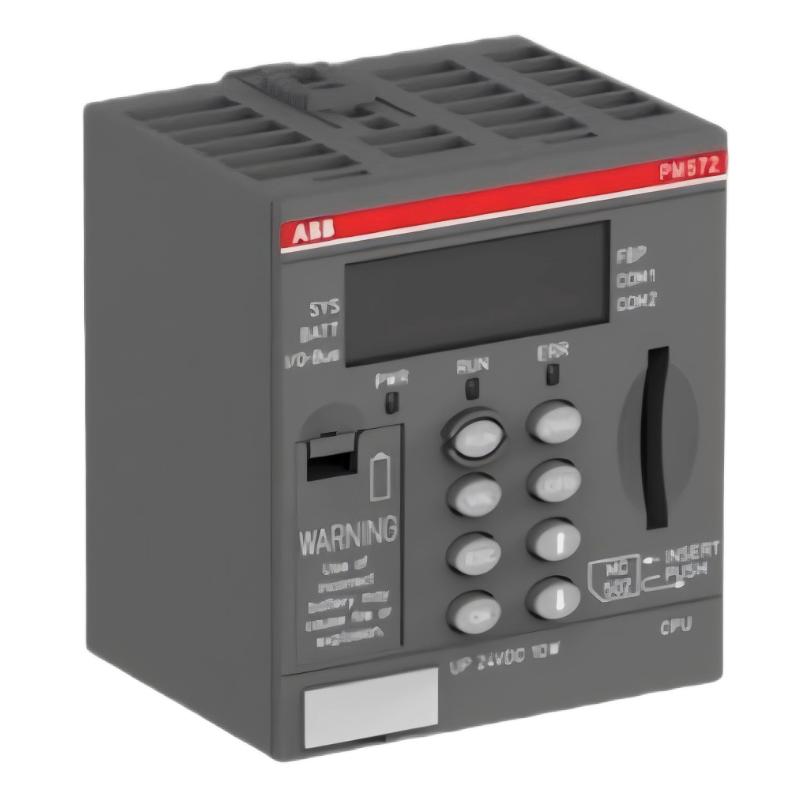
ABB PM572 CPU Module Installation Overview
The ABB PM572 1SAP130200R0200 CPU module requires correct 24 V DC power, compatible AC500 hardware, and verified system configuration before commissioning. This ABB PM572 Installation Guide focuses on practical mounting, serial communication setup, application loading, and startup validation for industrial PLC systems.
The PM572 is an AC500 processor module with 128 kB program memory, two configurable RS-232/RS-485 serial interfaces, a FieldBusPlug (FBP) interface, a memory card slot, and a diagnostic display. It does not have built-in Ethernet, so the communication architecture must be planned around its available interfaces and compatible expansion hardware.
Contents of the ABB PM572 Installation Guide
- Hardware preparation and compatibility
- CPU mounting and power checks
- RS-232/RS-485 wiring and communication
- PLC setup and commissioning
- System validation and acceptance
- Installation FAQ
- Final engineering summary
ABB PM572 Hardware Preparation and Compatibility
Before installation, confirm the complete order code on the CPU label. The PM572 identified by 1SAP130200R0200 is a 24 V DC processor module for the ABB AC500 platform. Confirm the compatible terminal base, power supply arrangement, I/O modules, and required communication accessories against the applicable ABB hardware documentation.
- Inspect the CPU, terminal base, connectors, and cabinet wiring for mechanical damage.
- Check that the control cabinet provides a suitable 24 V DC supply within the limits specified by ABB.
- Verify that the selected I/O modules and expansion arrangement are supported by the installed AC500 configuration.
- Prepare the correct Automation Builder software version and project files for the installed controller and firmware.
- Back up the existing application before replacing a CPU in an operating machine.
Engineering judgment matters here: a module that physically fits is not automatically compatible with every project, terminal base, firmware revision, or expansion arrangement. Resolve these points before applying power.
ABB PM572 CPU Mounting and Power Checks
Isolate the control cabinet supply before installing or removing the processor. Follow the terminal-base-specific ABB installation instructions and applicable electrical safety procedures. Seat the module fully and verify that the mechanical locking arrangement is engaged.
- Confirm that all relevant power sources are isolated and that hazardous stored energy has been addressed.
- Inspect the mounting interface and ensure that no connector pins or terminals are bent or contaminated.
- Install the CPU on its compatible base according to the manufacturer’s instructions.
- Check supply polarity and protective grounding arrangements as specified for the installed system.
- Restore power only after wiring and installation checks are complete.
During first power-up, measure the 24 V DC supply at the designated supply terminals using an appropriately rated meter. Record the measured voltage and compare it with the permitted operating range in the relevant hardware manual. A nominal 24 V reading at the power supply does not prove that the same voltage reaches the CPU under load.
ABB PM572 RS-232/RS-485 Wiring and Communication Setup
The PM572 provides two configurable serial interfaces used for supported programming and communication functions, including Modbus and CS31 applications. Interface mode, pin assignment, cable type, and protocol parameters must match the actual connected equipment.
- RS-232: Confirm the correct transmit, receive, and signal-reference connections for the specific cable and device.
- RS-485: Verify differential-line polarity, topology, termination, and biasing requirements for the network.
- Shielding: Apply the cabinet grounding and cable-shielding design specified for the installation.
- Protocol settings: Match baud rate, parity, data bits, stop bits, station address, and timeout settings at both ends.
Do not assume that two serial ports have identical pin assignments or that every cable advertised for an AC500 controller is suitable for every port mode. Confirm the relevant ABB connection diagram before wiring.
ABB PM572 PLC Setup and Commissioning Procedure
Use the supported engineering software and the correct project for the installed AC500 hardware. Before downloading an application, compare the project configuration with the physical rack, I/O arrangement, communication settings, and firmware requirements.
- Open the verified project in the applicable Automation Builder environment.
- Check the controller type and hardware configuration against the installed PM572.
- Review application build messages and resolve configuration or compilation errors.
- Establish the supported programming connection using the documented interface and cable.
- Download the approved application using the site’s change-control procedure.
- Verify the controller’s operating state, diagnostic display, and relevant status indicators.
- Test I/O behavior and serial communication under controlled conditions before authorizing automatic operation.
Commissioning checklist — illustrative pseudocode

VERIFY cpu_order_code == "1SAP130200R0200"
VERIFY supply_voltage within ABB_specified_range
VERIFY project_controller matches installed_CPU
VERIFY I_O_configuration matches installed_hardware
VERIFY serial_parameters match connected_device
VERIFY diagnostics show no unresolved critical fault
TEST inputs, outputs, interlocks, and communication
AUTHORIZE automatic operation only after approval
The commands above are a commissioning checklist, not executable ABB controller syntax. Carry out actual downloads and operating-mode changes using the supported engineering software and approved site procedures.
ABB PM572 System Configuration and Acceptance Testing
Commissioning is complete only when the PLC, connected devices, and machine interlocks behave as intended. Check the following under controlled operating conditions:
- CPU startup completes without unresolved diagnostic errors.
- Digital and analog I/O values agree with measured field conditions and configured scaling.
- Serial devices respond at the configured communication settings.
- Communication-loss handling, watchdog behavior, and safety-related interlocks operate as designed.
- The final application, hardware configuration, and parameter records are backed up.
For example, if a connected instrument is configured to transmit a value of 250 engineering units but the PLC displays 25, check the instrument’s output scaling, data format, register mapping, and PLC conversion logic before changing hardware. The numbers in this example are illustrative, not measured results from a verified installation.
ABB PM572 Installation and Commissioning FAQ
What power supply does the ABB PM572 require?
The PM572 system uses a 24 V DC supply. Verify the permissible voltage range, supply capacity, terminal assignment, and grounding requirements in the applicable ABB hardware manual for the installed configuration.
Does the PM572 have an integrated Ethernet port?
No. The PM572 1SAP130200R0200 has two configurable RS-232/RS-485 serial interfaces and an FBP interface, but no built-in Ethernet port. Network connectivity requirements should be assessed against compatible communication hardware.
Can I reuse an existing AC500 PLC project?
Potentially, provided that the project is compatible with the target CPU, firmware, I/O configuration, libraries, and communication architecture. Back up the current application and validate compatibility before downloading it.
How should serial communication be commissioned?
Confirm the electrical interface, cable and pinout, protocol, baud rate, parity, data format, station address, and termination requirements. Test a known-good transaction before enabling dependent machine sequences.
What should be checked before the first startup?
Check the exact module order code, compatible base, supply wiring, grounding, I/O configuration, application compatibility, communication connections, and machine safety conditions.
ABB PM572 CPU Module Installation Summary
A reliable ABB PM572 installation depends on hardware compatibility, stable 24 V DC power, correctly configured serial interfaces, and a validated AC500 application. Treat installation, Setup, and Commissioning as separate verification activities, and document the results before releasing the PLC Controller to production. Use the applicable ABB manuals and site-specific electrical and machine-safety procedures as the final authority for installation details.



