
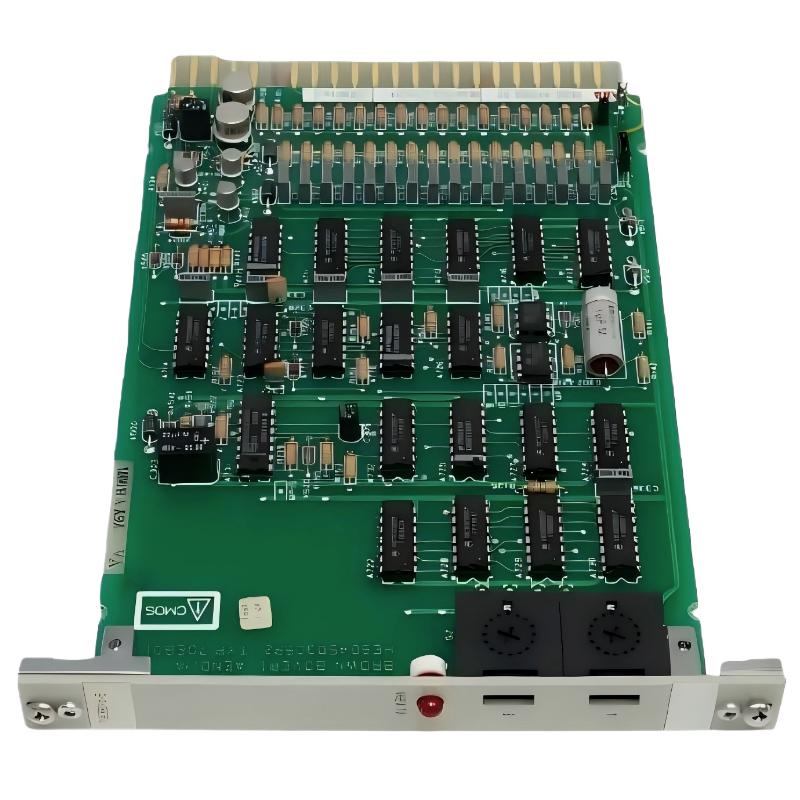
ABB 70EB01B-E Numeric Input Module Installation Guide
ABB 70EB01B-E HESG447005R2 installation should begin with signal identification, common-return verification, and cabinet wiring inspection rather than simply inserting the module into the rack. The unit is identified in available technical references as an ABB Procontrol P13 digital input module, with 16 input channels and 24 VDC field signaling. Before commissioning, engineers should confirm the exact rack configuration and site wiring against the applicable system documentation. :contentReference[oaicite:0]{index=0}
ABB 70EB01B-E Installation Guide Contents
ABB 70EB01B-E Numeric Input Module Role
The ABB 70EB01B-E, also referenced as HESG447005R2, is associated with the Procontrol P13 platform and is listed as a digital input module. Available technical data identifies 16 input channels, nominal 24 VDC input operation, and a 16-bit binary data representation. Some documentation describes the channels as being arranged in groups, so the common-return arrangement should be checked against the installed revision before field wiring is changed. :contentReference[oaicite:1]{index=1}
Typical field signals include contact status, limit-switch feedback, relay status and other binary process indications. The important installation principle is to treat the ABB 70EB01B-E as part of a complete signal chain: field device, terminal wiring, input channel, rack interface and controller configuration all have to agree.
ABB 70EB01B-E Installation Preparation and Risk Checks
Before the Setup phase, record the existing channel assignment. This prevents a common commissioning mistake in legacy DCS cabinets: moving a field wire to a physically similar terminal without checking the corresponding software point.
- Confirm the module marking: 70EB01B-E / HESG447005R2.
- Verify the installed Procontrol rack and module position.
- Record each field point and its expected normal state.
- Check the 24 VDC field supply before connecting the signal.
- Inspect terminal blocks for loose conductors, oxidation and damaged insulation.
- Compare the actual wiring with the approved system drawings.
Do not use an assumed pinout from an unrelated ABB input card. Legacy Procontrol installations can contain different revisions and cabinet arrangements, so the physical terminal documentation for the installed system remains the controlling reference.
ABB 70EB01B-E Numeric Input Wiring and Signal Verification
For a 24 VDC binary input, the commissioning engineer should first verify the voltage at the field termination and then verify that the same transition reaches the corresponding input channel. Available product data identifies approximately +11.2 VDC to +30 VDC as a logic-high region and a low region extending toward the negative side, with exact limits to be confirmed against the applicable technical documentation. :contentReference[oaicite:2]{index=2}
- Isolate the circuit according to the site’s electrical safety procedure.
- Identify the field device and its corresponding input channel.
- Check the common/return connection.
- Measure the field voltage with the device inactive.
- Operate the field device and measure the transition again.
- Confirm that the controller sees the same ON/OFF transition.
A useful field check is to compare the voltage measured at the source with the voltage measured at the module terminal. A significant difference indicates that the investigation should move toward the terminal block, cable, fuse, common return or intermediate relay rather than immediately replacing the ABB module.
ABB 70EB01B-E System Configuration Before Commissioning
System Configuration should be verified before live process testing. The channel address, signal description, normal state and alarm logic need to correspond with the control database. A correctly wired module can still appear faulty if the software point is mapped to another channel.
For maintenance records, capture the following information:
- Rack and slot location
- Channel number
- Field device tag
- Normal input state
- Measured field voltage
- Controller indication
- Alarm or interlock response
ABB 70EB01B-E Setup and Commissioning Validation
Commissioning should progress from an individual channel to the complete signal group. Start with a non-critical indication whenever possible. Toggle the field device and verify the physical voltage, input indication and controller status independently.
FIELD DEVICE
    |
    +-- Measure source voltage
    |
TERMINAL BLOCK
    |
    +-- Check continuity / common return
    |
70EB01B-E INPUT
    |
    +-- Verify channel state
    |
PROCONTROL CONTROLLER
    |
    +-- Verify point / alarm / interlock
The following pseudo-command sequence can be used as a commissioning checklist in a maintenance log:
CHECK MODULE 70EB01B-E
VERIFY RACK / SLOT
CHECK CHANNEL 01..16
MEASURE FIELD_VOLTAGE
TOGGLE FIELD_DEVICE
VERIFY INPUT_STATE
VERIFY CONTROLLER_POINT
VERIFY ALARM_LOGIC
RECORD RESULT
ABB 70EB01B-E Field Commissioning Case
In one commissioning case involving a legacy 24 VDC binary input circuit, the field device changed state correctly, but the controller indication remained unchanged. The initial assumption was an input-module problem. Instead of replacing the ABB 70EB01B-E immediately, the engineer measured the signal at three locations.
The field source measured approximately 24.1 VDC when active. At the terminal cabinet, the voltage was approximately 23.8 VDC, while the corresponding module input showed no valid transition. Continuity testing then identified a high-resistance termination in the signal path. After the termination was corrected, the module registered the transition normally.
This type of investigation is important because a failed indication does not automatically mean failed electronics. Signal-chain verification is often faster than exchanging a legacy module without evidence.
ABB 70EB01B-E Installation FAQ
What system is the ABB 70EB01B-E designed for?
The ABB 70EB01B-E HESG447005R2 is identified with the ABB Procontrol P13 platform and is used as a digital input module for binary field signals. :contentReference[oaicite:3]{index=3}
How many input channels does the ABB 70EB01B-E provide?
Available technical references identify the module as a 16-channel digital input module. :contentReference[oaicite:4]{index=4}
What field voltage is normally associated with the ABB 70EB01B-E?
Product references identify 24 VDC as the nominal input level, with one technical listing specifying a logic-high region beginning around +11.2 VDC. Always verify the installed revision documentation before commissioning. :contentReference[oaicite:5]{index=5}
Should the input channel be tested before connecting the process signal?
Yes. A controlled voltage and continuity check helps separate wiring problems from module problems before the signal is introduced into the live control sequence.
Can a wrong System Configuration look like a hardware fault?
Yes. Incorrect channel mapping, signal inversion or alarm configuration can make a correctly operating input appear incorrect at the operator interface.
ABB 70EB01B-E Installation Guide Conclusion
The practical approach to ABB 70EB01B-E Installation, Setup and Commissioning is to validate the complete signal path rather than treating the module as an isolated component. Confirm the module identity, field voltage, common return, channel assignment and System Configuration before declaring the input hardware defective. For legacy Procontrol installations, disciplined measurements and accurate cabinet records are especially valuable when replacement modules are limited or obsolete.



