
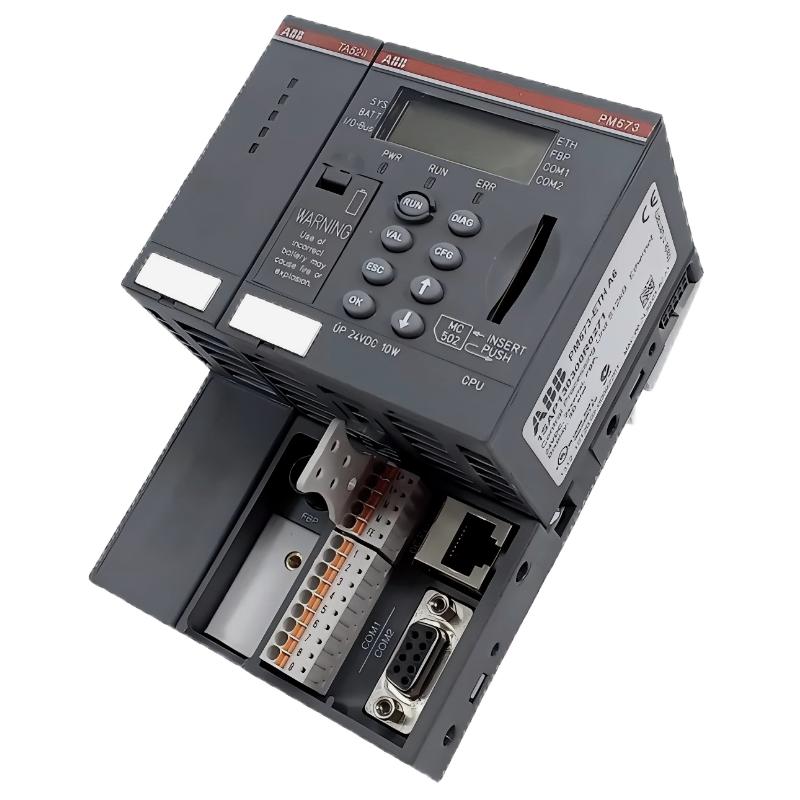
ABB PM573 CPU Installation Guide and Application Overview
The ABB PM573 CPU Programmable Logic Controller requires correct power wiring, compatible I/O configuration, and verified communication settings before commissioning. A reliable installation starts with confirming the exact controller variant and its hardware documentation, then checking the electrical supply, terminal connections, program configuration, and field signals. These checks help prevent startup failures that can otherwise be mistaken for a defective PLC Controller.
ABB PM573 PLC Hardware and Installation Preparation
Before mounting or replacing an ABB PM573 CPU, confirm the full product code, hardware revision, supply requirements, supported expansion modules, and programming environment against the applicable ABB documentation. Do not assume that similarly named CPU variants share identical terminals or electrical specifications.
- Inspect the CPU housing, connectors, mounting points, and terminal condition.
- Check the control cabinet for excessive heat, conductive dust, moisture, and vibration.
- Verify that the selected power supply and protective devices match the documented requirements.
- Confirm that connected PLC modules and field devices are supported by the intended controller configuration.
- Back up the existing application before replacing a controller in an operating installation.
ABB PM573 CPU Power Wiring and Signal Integrity
Incorrect power connections, loose terminals, and poor signal references can produce intermittent PLC behavior. Isolate the cabinet supply before making wiring changes, and follow the equipment manufacturer’s electrical safety procedures.
- Identify the documented power terminals and protective-earth requirements.
- Check conductor size, terminal tightness, cable routing, and circuit protection.
- Separate low-level analog signal wiring from high-noise motor and drive cables where the installation design requires it.
- Verify sensor output type and voltage compatibility before connecting an input channel.
- Inspect communication cables, shielding arrangements, and connector seating.
For analog signals, compare the measured field signal with the value expected by the configured input module. For digital inputs, verify the electrical state at the terminal rather than relying only on the operator interface indication.
ABB PM573 PLC System Configuration and Program Setup
The System Configuration must match the installed hardware and the application project. Confirm the controller target, firmware compatibility, I/O mapping, communication parameters, and application startup behavior before transferring a program.
- Use the programming software and project format specified for the exact PM573 variant.
- Verify the controller identity and firmware before downloading an application.
- Review I/O addresses, scaling values, interlocks, timers, and communication settings.
- Check whether retained variables or startup initialization routines affect machine behavior.
- Document the original application version and the approved changes.
Do not use guessed terminal addresses, undocumented commands, or configuration settings copied from another controller model. The correct values must come from the project and product-specific technical documentation.
ABB PM573 Setup and Commissioning Validation
Commissioning should begin with the machine in a safe state. Confirm that emergency-stop circuits and other safety functions operate independently as designed; ordinary PLC logic must not be treated as a substitute for certified safety equipment.
- Apply power according to the approved commissioning procedure and observe the controller status indicators.
- Connect with the supported engineering software and confirm that the correct CPU is detected.
- Check diagnostic messages, application status, and configured I/O availability.
- Test each relevant input using a known field condition and compare the physical state with the software indication.
- Verify output operation with actuators safely isolated or otherwise controlled as required by the risk assessment.
- Run functional tests for permissives, alarms, interlocks, and recovery after power interruption.
Commissioning checklist (illustrative, not executable PLC commands):
1. Confirm CPU identity and firmware
2. Verify supply against the product specification
3. Review controller diagnostics
4. Validate I/O mapping
5. Test interlocks and alarm handling
6. Record final configuration and test results
ABB PM573 Installation Guide: Field Verification Example
Illustrative engineering scenario, not a verified customer case: During a hypothetical startup, an input displayed in the PLC software remains inactive even though a proximity sensor appears to detect a target. An engineer should not immediately replace the CPU. The investigation begins by checking the sensor’s supply, output type, common reference, terminal wiring, and input-module compatibility.
Suppose the sensor supply measures 24.1 V DC and its output changes state at the sensor connector but not at the PLC input terminal. This observation points toward a wiring, common-reference, or connection issue rather than proving a CPU failure. The next action is to compare the signal at successive test points with the wiring diagram and module specifications. Record actual measurements before making corrective changes.
ABB PM573 CPU Installation FAQ
Which information should be checked before installing an ABB PM573?
Confirm the complete order code, hardware revision, supply requirements, compatible modules, firmware, and applicable ABB installation documentation.
Why should the existing PLC application be backed up?
A verified backup helps preserve program logic, configuration, and retained-data information when a controller is replaced or reconfigured.
Can I use a project from another ABB CPU?
Only after verifying software compatibility, target hardware, supported instructions, I/O mapping, and communication configuration. Similar product names do not guarantee project compatibility.
How can I verify sensor signals during commissioning?
Compare the physical sensor output and the signal at the receiving input terminal with the documented electrical interface. Then verify the corresponding software state.
What should be recorded after PLC commissioning?
Record the CPU identification, firmware, project version, configuration changes, diagnostic results, I/O test outcomes, and outstanding issues.
ABB PM573 PLC Installation: General Conclusion
A dependable ABB PM573 CPU installation depends on product-specific verification, correct electrical connections, compatible System Configuration, and controlled functional testing. Treat measured signals and diagnostic messages as evidence, and distinguish verified findings from assumptions. Before returning equipment to service, save the approved project, document test results, and confirm that all machine safety measures remain effective.



