100% Original, Ready to Ship!

ABB PP846 3BSE042238R1 Operation Panel Screen Installation Guide
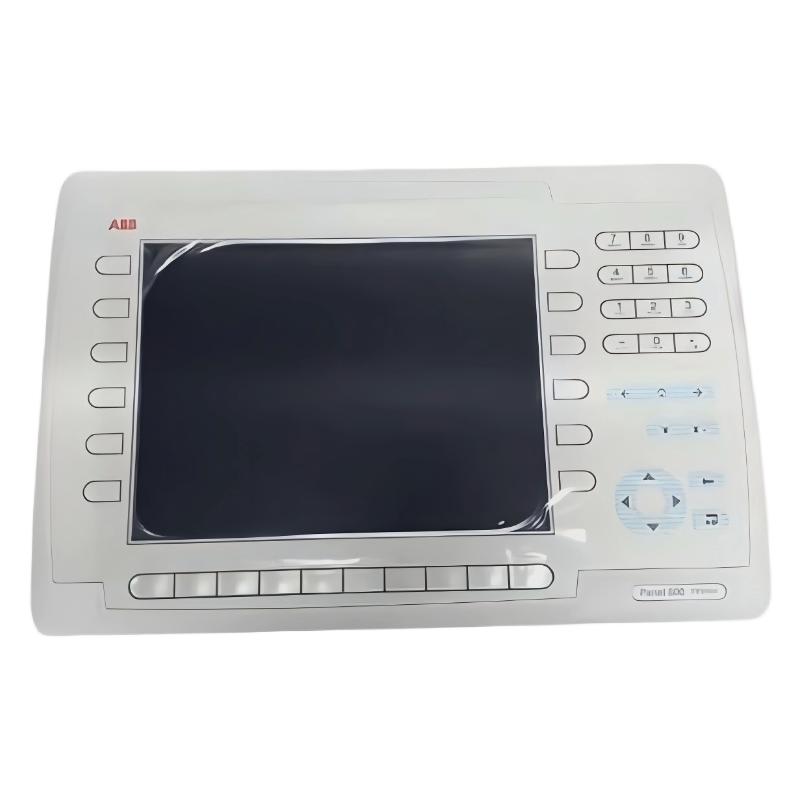
ABB PP846 3BSE042238R1 Operator Panel Installation Overview
The ABB PP846 3BSE042238R1 Operation Panel is a Panel 800 series industrial operator interface designed for displaying process information and exchanging operator commands with a connected controller. A reliable ABB PP846 installation depends on correct panel mounting, stable power delivery, compatible communication settings, and a validated HMI project. This Installation Guide explains the practical checks required before Setup and Commissioning, with particular attention to communication faults that can appear after an apparently successful startup.
ABB PP846 Panel 800 Specifications and Installation Requirements
Before preparing the control cabinet, verify the product identification and hardware revision against the equipment documentation. The PP846 is a function-key operator panel with a color TFT display and an 800 × 600 pixel resolution.
- Model: ABB PP846
- Part number: 3BSE042238R1
- Product family: Panel 800
- Display: 10.4-inch color TFT, 800 × 600 pixels
- Power supply: Verify the nameplate and applicable hardware manual before wiring; published PP846 documentation specifies a 24 V DC supply with an operating range of 20–30 V DC.
- Interfaces: Depending on the documented hardware configuration, serial, Ethernet, USB, and CompactFlash connections may be available.
- Front protection: IP66 when correctly installed with the specified sealing arrangement; rear protection is IP20.
These values should be checked against the exact unit and its official hardware documentation. Do not assume that similarly named PP846 variants have identical electrical connections or accessories.
ABB PP846 Installation Guide: Cabinet Preparation and Mounting
Panel installation begins with the cabinet opening rather than the communication cable. An uneven cutout, excessive mounting pressure, or damaged gasket can compromise the front seal even when the panel powers up normally.
- Isolate the relevant power sources and follow the plant’s lockout/tagout procedure.
- Inspect the panel label, enclosure, display, connectors, and mounting gasket for damage.
- Measure the cabinet cutout against the dimensions in the applicable ABB PP846 Hardware and Installation manual.
- Remove burrs and metal particles from the mounting opening before inserting the panel.
- Fit the panel evenly and tighten the mounting hardware according to the manufacturer’s instructions.
- Check that the gasket contacts the cabinet surface continuously and that no cable or obstruction prevents correct seating.
Field experience shows that enclosure problems are often introduced during mechanical installation. A panel that works during a dry test may still be vulnerable to dust or moisture if its seal is pinched or the mounting surface is distorted.
ABB PP846 Power Wiring and Electrical Checks
A stable supply is essential for dependable display operation and controller communication. Before energizing the operator panel, identify the specified positive, negative, and protective connections from the unit’s wiring diagram. Never determine terminal polarity from wire color alone.
- Confirm the DC supply rating and polarity against the hardware manual.
- Inspect terminal tightness, conductor condition, and protective grounding arrangements.
- Keep low-level communication wiring away from high-current switching conductors where practicable.
- Measure voltage at the panel terminals during startup, not only at the power supply output.
- Check for voltage dips when nearby contactors, drives, or other loads operate.
For a unit documented for 20–30 V DC operation, a measured 24.1 V DC at the panel terminals is an illustrative acceptable supply reading. It is not a universal commissioning result. The actual voltage must remain within the limits specified for the installed hardware under operating load.
ABB PP846 System Configuration and Controller Communication
The PP846 HMI project is normally configured on a computer using the compatible Panel Builder 800 engineering environment and then transferred to the panel. The correct software version, firmware compatibility, communication driver, and project revision should be established before commissioning.
Review these configuration items before downloading the project:
- Controller model and communication protocol.
- Serial interface selection and communication parameters, if serial communication is used.
- Ethernet address, subnet mask, and any required gateway settings, if Ethernet is used.
- Controller tag names, data types, register addresses, and access permissions.
- Alarm definitions, screen navigation, function-key assignments, and operator permissions.
A project can load correctly while displaying stale values if its controller address or tag mapping is incorrect. For this reason, System Configuration should be verified separately from the panel’s basic startup.
ABB PP846 Setup and Commissioning Validation
Commissioning should demonstrate that the display, operator inputs, communication channel, and control-system response work together. A lit screen alone does not prove that the HMI is ready for service.
- Restore power and confirm that the panel starts without unexpected diagnostic indications.
- Check the display for missing areas, unstable brightness, distorted graphics, or startup loops.
- Load the approved HMI project and verify that the expected screens and navigation are present.
- Confirm communication with the controller using known, safe process values.
- Compare displayed values with the controller engineering station or an independently verified reference.
- Test alarms, acknowledgement functions, and permitted operator commands under the plant’s approved test procedure.
- Record the firmware, project revision, communication settings, and commissioning results.
For command testing, use an approved test condition or simulation where possible. Do not operate live machinery merely to confirm that a function key responds.
ABB PP846 Installation Fault Prevention: Engineering Case Example
Illustrative field case: A newly installed PP846 starts normally, but process values intermittently stop updating when a nearby drive begins operating. Replacing the panel immediately would be premature because the symptom can result from power instability, communication interference, or incorrect network configuration.
The commissioning engineer first compares the panel’s displayed values with the controller’s live data. Next, the engineer checks the panel supply during drive operation and inspects cable routing, shield termination, connector seating, and communication diagnostics. If the supply remains within specification but communication errors increase during switching events, the investigation should focus on the communication path and electromagnetic compatibility before hardware replacement is considered.
This is a diagnostic example, not a claim of a verified incident or measured repair outcome. Actual readings and corrective actions must be recorded from the equipment under test.
ABB PP846 Installation Guide FAQ
Which software is used for ABB PP846 Setup and Commissioning?
Panel Builder 800 is the configuration environment associated with the Panel 800 family. Confirm the version and firmware compatibility using the applicable ABB documentation for the installed panel.
Why does the ABB PP846 start but show no live process values?
Check controller connectivity, the selected communication driver, network or serial parameters, tag mapping, and controller data availability. A successful display startup does not confirm a valid controller connection.
Can an existing PP846 HMI project be reused after panel replacement?
Potentially, provided that the replacement hardware, firmware, engineering software, communication interfaces, and project version are compatible. Back up the original project and validate the replacement before returning the system to service.
What should be checked before replacing an ABB PP846 Operation Panel?
Verify the supply voltage, connector condition, controller communication, configuration files, firmware compatibility, and diagnostic indications. Replacement should follow evidence that distinguishes a panel hardware failure from an external wiring or configuration problem.
ABB PP846 Installation Guide: Final Commissioning Summary
Successful ABB PP846 3BSE042238R1 installation requires more than mounting the display and applying power. Mechanical sealing, verified DC supply, correct System Configuration, compatible HMI software, and tested controller communication must all be confirmed. Preserve the approved project and commissioning records so future maintenance teams can compare changes against a known working baseline.
 ABB 89NU04A/89NU04A-E/89NU04B-E GKWE853000R0200 Coupled Module
 ABB PP845 3BSE042235R1 Operation Panel Installation Guide
 ABB 89NU01E Safety Relay Installation Guide
 ABB PP825 3BSE042240R1 Operation Panel Installation Guide