100% Original, Ready to Ship!

ABB 88UM01A GJR2329800R0100 Bus Control Module Installation Guide: System Setup And Commissioning
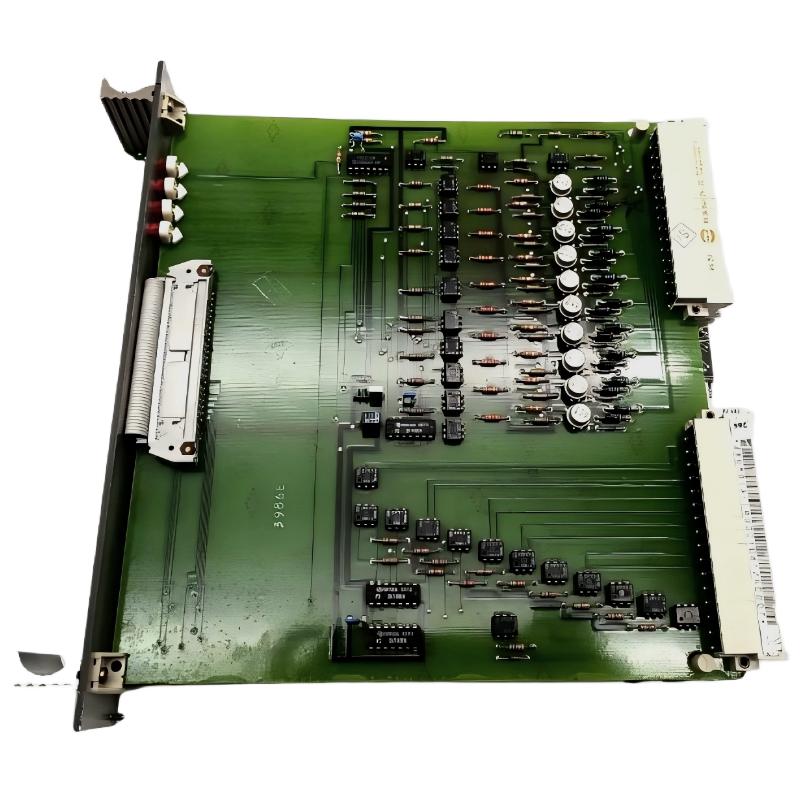
The ABB 88UM01A GJR2329800R0100 Bus Control Module requires careful hardware verification, bus connection checks, and system configuration validation before commissioning. When installing this monitoring module in an industrial automation system, the priority is to confirm compatibility with the existing control architecture, follow the applicable ABB hardware documentation, and verify communication behavior before returning the equipment to service.
ABB 88UM01A Bus Control Module Installation Overview
The ABB 88UM01A is identified by the product designation GJR2329800R0100 and is described as a Bus Control Module Monitoring Module. Before installation, confirm the exact module identity, supported rack or mounting arrangement, interface requirements, and intended function in the target system. Do not assume that wiring assignments or configuration procedures from another ABB module are interchangeable.
Installation Preparation for ABB 88UM01A GJR2329800R0100
- Verify the complete part number against the equipment list and installed system documentation.
- Inspect the module, connector contacts, mounting points, and housing for damage or contamination.
- Review the approved electrical drawings, bus topology, grounding scheme, and applicable installation instructions.
- Confirm power isolation requirements and follow site lockout/tagout procedures before handling the hardware.
- Record the existing controller configuration and relevant communication parameters before making changes.
Hardware Compatibility and System Configuration
Successful Setup depends on more than physical fit. Check whether the existing control system supports the module, whether the intended bus interface matches the system architecture, and whether any required configuration files or engineering tools are available. The exact supply voltage, connector pinout, termination requirements, and firmware compatibility must be confirmed from documentation for the installed configuration rather than estimated.
ABB 88UM01A Bus Connection and Mounting Checks
Install the module only in its approved mounting position and use the specified retention method. Inspect connectors before mating them, and avoid forcing a connector that does not align correctly. Route bus cables according to the site’s electrical design, separating communication wiring from high-noise power conductors where required. Apply shielding and grounding practices specified for the actual interface.
- Isolate the relevant equipment and verify the safe state.
- Check the module label and mounting location against the approved drawings.
- Inspect the connector and cable termination before connection.
- Secure the module and verify connector engagement.
- Recheck wiring and grounding before restoring power under the approved procedure.
ABB 88UM01A Setup and Commissioning Procedure
Commissioning should proceed from basic hardware checks to system-level communication validation. First confirm that the module is recognized by the applicable control platform. Next, inspect available status indicators and diagnostic messages. Finally, verify that the intended monitoring or bus-control function behaves as expected in the approved operating state.
Commissioning checklist:
1. Verify module identity and mounting.
2. Confirm supply and grounding against approved drawings.
3. Inspect available module status indications.
4. Review controller diagnostics and bus configuration.
5. Validate communication and expected system response.
6. Record results before handover.
The checklist above is a generic commissioning aid, not a native ABB command sequence. Use the engineering software and diagnostic instructions applicable to the installed control system.
ABB 88UM01A Installation Fault Diagnosis
If the module is not recognized after installation, do not immediately conclude that the module has failed. Check the configuration, mounting, connector seating, bus wiring, and controller diagnostic history first. If communication is intermittent, examine cable routing, shield continuity, grounding, and the bus topology against the system design. Compare measurements with the documented limits for the actual interface; there is no safe universal voltage value that can be assumed for every bus implementation.
ABB 88UM01A Field Commissioning Example
Consider a commissioning investigation in which a newly installed module does not appear in the controller diagnostics. The engineer first verifies the part number and mounting position, then checks the connector and compares the bus wiring with the approved drawing. After confirming the physical installation, the engineer reviews the system configuration and controller event log before repeating the recognition test. This is an illustrative diagnostic scenario, not a verified report of a specific ABB field installation. Record actual measurements, timestamps, and corrective actions when documenting a real commissioning event.
ABB 88UM01A Installation Guide FAQ
What should be verified before installing the ABB 88UM01A?
Verify the complete part number, system compatibility, mounting requirements, approved wiring diagrams, and the safe isolation procedure for the equipment.
Can the ABB 88UM01A be installed without checking the bus configuration?
No. The bus architecture, connection requirements, and supported configuration must be confirmed before commissioning.
What should be checked if the controller does not recognize the module?
Inspect the physical connection, module placement, controller diagnostics, configuration settings, and compatibility information before considering hardware replacement.
Which voltage should be measured during commissioning?
Use the voltage limits and measurement points specified in the documentation for the installed system. Do not apply generic values to an unverified interface.
Should the existing configuration be backed up?
Yes. Preserve the existing configuration and relevant diagnostic records before making changes so that the previous operating state can be restored if necessary.
Conclusion: ABB 88UM01A Bus Control Module Commissioning
A reliable ABB 88UM01A GJR2329800R0100 Installation Guide should prioritize part-number verification, approved wiring, hardware compatibility, System Configuration, and documented commissioning tests. The module should be returned to service only after the applicable electrical and communication checks pass. Exact connection details and operating limits must come from the documentation for the specific installed system.
General note: This article provides general industrial installation guidance. It does not replace ABB product documentation, site safety procedures, or the engineering drawings for the installed control system. Any field case should be documented using verified observations rather than assumed measurements.
 ABB PP845 3BSE042235R1 Operation Panel Installation Guide
 ABB 89NU01E Safety Relay Installation Guide
 ABB PP825 3BSE042240R1 Operation Panel Installation Guide
 ABB 89NU01D-E GJR2329100R0100 Alarm Module Installation Guide