
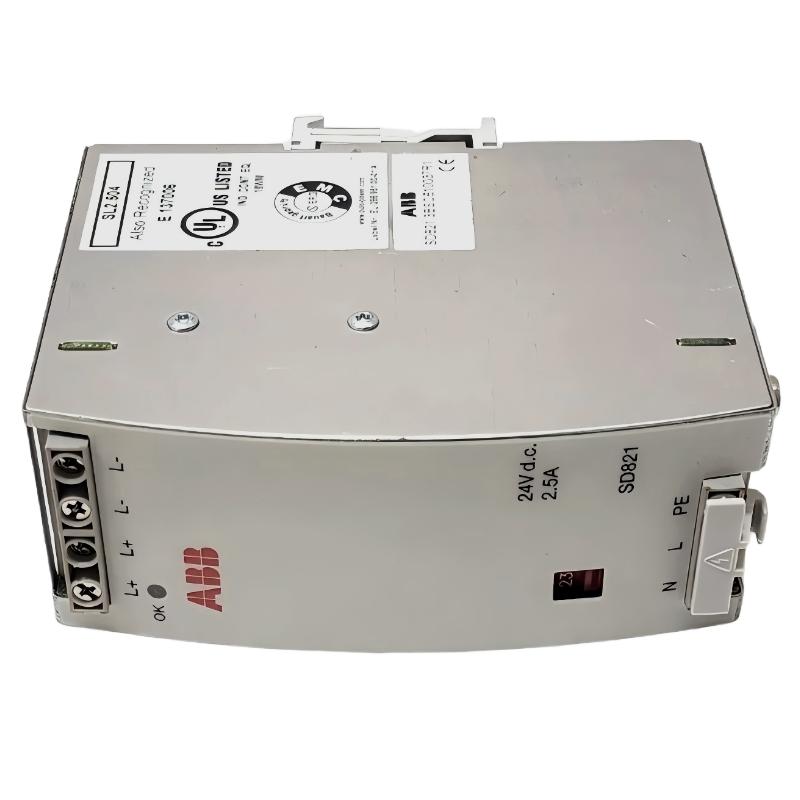
ABB SD821 3BSC610037R1 Power Supply Fault Diagnosis
ABB SD821 3BSC610037R1 power supply faults commonly require checking the AC input selection, incoming voltage, 24 VDC output, and connected load before replacing the unit. The SD821 is rated for a 24 VDC output at 2.5 A, equivalent to 60 W, with a selectable 115/230 VAC input. A green front-panel LED indicates that the output circuit is providing the correct voltage level, making it a useful initial observation during Troubleshooting.
In an ABB AC 800M control cabinet, an unstable supply can cause controller resets, module startup failures, or intermittent loss of control power. However, these symptoms do not automatically prove that the power supply has failed. Effective Fault Diagnosis requires separating input-side problems, converter faults, wiring resistance, and excessive downstream demand.
ABB SD821 Power Supply Fault Symptoms and Initial Observations
Start by recording the actual symptom before disturbing the wiring. The relationship between the front-panel indication, measured output, and system behavior helps determine the next test.
- No output indication: Check the incoming AC supply, input selector setting, protective device, and output condition.
- Green LED off: Investigate whether the unit is receiving the correct input and whether the output circuit is operating normally.
- Controller or module restarts: Measure the 24 VDC supply during startup and under load rather than relying on a no-load reading.
- Output voltage drops under load: Check for excessive current demand, a short circuit, loose terminals, or voltage drop along the distribution wiring.
- Repeated protective trips: Investigate downstream wiring and connected equipment before attempting another energization.
One practical rule is to avoid replacing the SD821 solely because a PLC Controller or I/O Module has stopped responding. The same symptom can result from a damaged cable, a failed load, or an upstream AC supply problem.
ABB SD821 Troubleshooting: Trace the Fault from AC Input to DC Output
The most efficient troubleshooting approach follows the energy path through the equipment. Measurements should be taken only by qualified personnel using appropriately rated instruments and approved test points.
- Confirm the incoming supply. Measure the AC input at the designated terminals and compare it with the intended supply arrangement.
- Inspect the voltage selector. Verify that the 115/230 VAC selector matches the actual input voltage. The documented factory-default position is 230 V; never assume a replacement unit retains that setting.
- Check the output indication. Observe the green LED and compare its status with the measured DC output.
- Measure the 24 VDC output. Record the voltage at the power supply and, where safe and appropriate, at the downstream distribution point.
- Compare loaded and unloaded behavior. If the output is acceptable without the load but deteriorates when connected, investigate the load, wiring, and total current demand.
- Review the control system. Check controller diagnostics, module status, and event logs after verifying that the supply is stable.
Do not change the input selector while the unit is energized. Follow the manufacturer’s isolation and verification procedure before changing any electrical connection or selector setting.
ABB SD821 3BSC610037R1 Common Power Supply Failure Causes
Incorrect AC Input Selection
An incorrect selector setting can prevent normal operation and may damage equipment if the applied voltage is incompatible with the selected input. Verify both the actual incoming voltage and the selector position against the manufacturer’s instructions before further testing.
Overloaded 24 VDC Distribution
The SD821 has a rated output current of 2.5 A. The combined continuous load must remain within the documented capacity and applicable operating limits. Include the power requirements of connected controllers, communication equipment, and other loads supplied by the same circuit.
High Resistance in Output Wiring
A loose terminal or damaged conductor can create a voltage difference between the power supply and a remote module. If the voltage measured at the source is stable but the remote voltage is lower, inspect the positive and return conductors, terminal connections, and load current.
Downstream Short Circuit or Defective Module
A shorted cable or malfunctioning Module can pull down the DC bus. Isolate the affected branch according to the approved maintenance procedure and reconnect loads systematically to identify the circuit associated with the abnormal condition.
Power Supply Component Degradation
If the input is correct, the wiring is sound, and the load is within specification, yet the SD821 cannot maintain its specified output, an internal fault becomes more likely. Confirm the diagnosis using the manufacturer’s service guidance or an approved replacement test.
ABB SD821 Power Supply Fault Investigation: Field Diagnostic Example
Consider a representative industrial maintenance scenario in which an AC 800M control cabinet experiences intermittent controller restarts. The SD821 green LED appears normal during an initial inspection, but the restarts continue when additional equipment starts.
The engineer should avoid concluding that the supply is healthy based on the LED alone. First, record the output voltage with the cabinet in a stable operating state. Next, monitor the voltage during the event and compare measurements at the power supply and the affected equipment.
For illustration, suppose the source measures 24.0 VDC under a light load, while the voltage at the remote distribution point falls to 21.8 VDC during equipment startup. These are hypothetical diagnostic readings, not measurements from a verified SD821 field case. The difference would justify checking conductor resistance, terminal tightness, startup current, and the connected load before condemning the power supply.
If the voltage also falls at the source terminals, assess the total load and supply behavior under the same conditions. If the source remains stable but the remote voltage drops, focus on the distribution path. This comparison provides a more defensible root-cause assessment than replacing components by trial and error.
ABB SD821 Troubleshooting Diagnostic Commands and Test Records
The SD821 is a power conversion device, not a programmable PLC Controller. It should not be expected to accept software diagnostic commands directly. The following pseudocode can be used to structure a maintenance checklist or troubleshooting report.
BEGIN_FAULT_DIAGNOSIS

record_input_voltage()
verify_input_selector()
record_front_panel_led()
measure_output_voltage_at_source()
measure_voltage_at_affected_load()
compare_loaded_and_unloaded_readings()
calculate_total_load_current()
inspect_wiring_and_terminal_connections()
review_controller_and_module_diagnostics()

IF source_voltage_is_low:
    investigate_input_load_and_power_supply()
ELSE IF remote_voltage_is_low:
    investigate_distribution_wiring_and_connections()
ELSE:
    continue_downstream_fault_diagnosis()

record_root_cause_and_corrective_action()

END_FAULT_DIAGNOSIS
This is an engineering workflow, not executable ABB software or a manufacturer-defined diagnostic interface. Actual acceptance limits must come from the applicable SD821 documentation and the installed system design.
ABB SD821 Power Supply Repair and Replacement Decisions
Repair decisions should be based on the confirmed fault and the applicable maintenance policy.
- Input-side issue: Correct the supply or selector configuration only after safely isolating the equipment and verifying the correct arrangement.
- Wiring fault: Repair or replace defective conductors and terminals, then repeat the required electrical checks.
- Excessive load: Identify the source of abnormal current demand and confirm that the resulting configuration remains within the SD821’s rating.
- Internal power supply fault: Replace the unit or use an authorized repair route according to the manufacturer’s requirements and site policy.
- Redundant power architecture: Where redundancy is required, use the appropriate ABB SS82x Voting Unit arrangement. Do not directly parallel independent outputs unless the manufacturer explicitly permits the configuration.
Before replacing a unit, document the part number, input selector position, input and output measurements, load conditions, and diagnostic observations. After replacement, repeat the Setup / Commissioning checks and confirm that the controller and connected modules operate normally.
ABB SD821 3BSC610037R1 Troubleshooting FAQ
Why does the ABB SD821 power supply have no green LED indication?
Possible causes include missing AC input, an incorrect 115/230 VAC selector setting, an internal converter fault, or an abnormal output condition. Check the input and output using the manufacturer’s approved procedure before deciding whether replacement is necessary.
What is the rated output of the ABB SD821 3BSC610037R1?
The SD821 provides a regulated 24 VDC output rated at 2.5 A, corresponding to 60 W. The connected load must remain within the applicable manufacturer specifications.
Can a low 24 VDC reading cause PLC communication faults?
Yes. An unstable supply may reset a controller, communication interface, or network-related Module. Verify the supply voltage at the affected equipment and correlate any voltage disturbance with controller diagnostics before investigating network cabling or communication configuration.
How can an overloaded SD821 be identified?
Compare the total connected load with the 2.5 A rated output and investigate abnormal current demand. A voltage drop under load is a useful clue, but it must be distinguished from wiring resistance, a short circuit, and an internal supply fault.
Can two ABB SD821 units be connected directly in parallel?
Do not assume that direct parallel connection is permitted. For the documented redundant arrangement, ABB specifies the appropriate SS82x Voting Unit. Confirm the exact system design and product documentation before making redundancy connections.
Should the entire PLC system be replaced when an SD821 fails?
No. A confirmed power supply fault generally calls for correction of the supply problem or replacement of the affected unit, followed by system validation. Other controllers and modules should be replaced only if independent testing demonstrates that they are defective.
What measurements should be recorded during SD821 Fault Diagnosis?
Record the AC input voltage, selector position, 24 VDC output, load current where measurable, remote distribution voltage, LED status, and the conditions under which the fault occurs. These records help distinguish an input fault, overload, wiring problem, and internal converter failure.
When should the ABB SD821 be replaced instead of repaired?
Replacement is appropriate when an internal failure has been confirmed and repair is not approved, economical, or supported by the applicable service procedure. Isolate the unit before removal and validate the replacement under the intended operating load.
ABB SD821 3BSC610037R1 Power Supply Troubleshooting Conclusion
Reliable ABB SD821 Troubleshooting depends on tracing the electrical path from the incoming AC supply through the 24 VDC converter to the connected control equipment. Checking the selector position, measuring the output under operating conditions, and comparing source and remote voltages can help isolate the root cause without unnecessary component replacement.
For long-term reliability, retain the Fault Diagnosis results, corrective actions, and final System Configuration in the maintenance record. A disciplined process supports safer repair decisions and helps engineers distinguish a defective SD821 Power Supply from a downstream Module, wiring, or load-related fault.



