
Table of Contents
- ABB 35ZE94 GJR5146620R0001 Processor Board Overview
- Installation Preparation and System Configuration
- Processor Board Wiring and Hardware Setup
- ABB 35ZE94 Commissioning Procedure
- Field Commissioning Experience
- ABB 35ZE94 Processor Board FAQ
- General Overview
ABB 35ZE94 GJR5146620R0001 Processor Board Installation Guide Overview
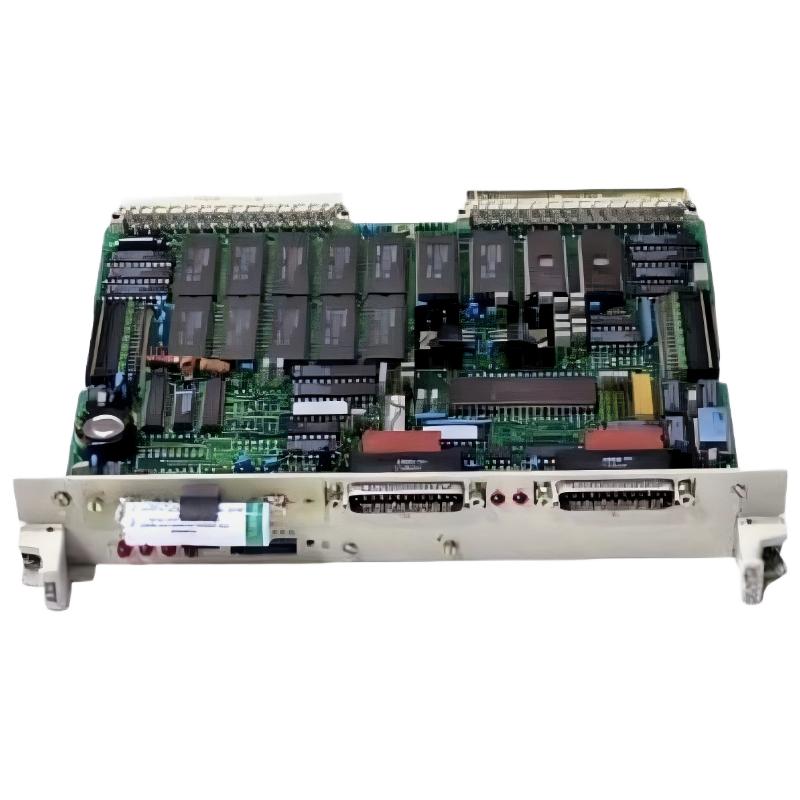
ABB 35ZE94 GJR5146620R0001 Processor Board installation requires correct hardware integration, system configuration verification, and communication testing before commissioning. This ABB Processor Board is commonly identified as a CPU control component for ABB Procontic automation systems. Proper setup ensures stable PLC Controller operation and reliable industrial process control.
The 35ZE94 / 35ZE94G processor board is designed for industrial automation environments where CPU processing reliability and long-term operation are critical. Before installation, engineers should confirm the board reference, backplane compatibility, firmware requirements, and existing PLC Controller parameters.
ABB 35ZE94 Processor Board Installation Preparation and System Configuration
A successful Installation Guide procedure starts with checking the complete control architecture rather than replacing the board directly. The following preparation steps are recommended:
- Verify ABB 35ZE94 GJR5146620R0001 part number before installation.
- Check rack position and backplane connector condition.
- Record existing PLC Controller parameters and memory configuration.
- Confirm power supply stability before inserting the Module.
- Backup existing System Configuration files.
Field engineers normally inspect supply voltage first. A processor board may appear faulty when the real problem is unstable DC power or poor grounding.
Measure:
DC Voltage = 24V ±10%
Ground Resistance < 1Ω
Communication Status = Normal
CPU LED = RUN
ABB 35ZE94 PLC Controller Wiring and Hardware Setup
During ABB 35ZE94 Setup, the processor board should be installed carefully to avoid connector damage. The installation sequence should follow the engineering logic of mechanical inspection, electrical connection, and communication verification.
- Switch off cabinet power completely.
- Remove the existing processor Module carefully.
- Inspect rack contacts for oxidation or contamination.
- Insert the ABB 35ZE94 Processor Board into the correct slot.
- Reconnect communication interfaces and power supply.
Incorrect insertion force or damaged edge connectors are common causes of startup problems after replacement.
ABB 35ZE94 GJR5146620R0001 Setup and Commissioning Procedure
The ABB 35ZE94 Commissioning process should include hardware checks, PLC Controller communication tests, and operational validation.
- Check processor initialization status.
- Verify communication between CPU and connected Modules.
- Load approved System Configuration.
- Monitor CPU scan performance.
- Perform functional testing with field devices.
A typical commissioning diagnostic sequence:
START TEST

Check Power Supply
|
Check CPU Status LED
|
Verify Communication Bus
|
Load Configuration
|
Run Application Test

END
ABB 35ZE94 Processor Board Real Field Commissioning Experience
In one commissioning case involving an ABB 35ZE94 replacement, the processor board was installed successfully but the PLC Controller remained in initialization mode. Engineers initially suspected firmware mismatch.
After measurement, the actual issue was identified as unstable cabinet grounding. The measured 24V supply fluctuated between 21.8V and 23.1V during motor startup. After correcting grounding and replacing a damaged power terminal, the processor entered RUN status and communication recovered.
This case shows that ABB Processor Board installation problems are not always caused by the Module itself. Field diagnosis should always include power quality and system environment checks.
ABB 35ZE94 GJR5146620R0001 Processor Board FAQ
What system is ABB 35ZE94 GJR5146620R0001 used in?
The ABB 35ZE94 GJR5146620R0001 is a Processor Board used in ABB industrial automation control systems. It performs CPU processing tasks inside the PLC Controller architecture.
What should be checked before replacing the ABB 35ZE94 Module?
Engineers should verify power supply voltage, rack condition, communication status, and existing System Configuration before replacement.
Why does the ABB 35ZE94 PLC Controller fail to start after installation?
Common reasons include incorrect rack installation, unstable power supply, communication bus problems, or configuration mismatch.
How can ABB 35ZE94 Fault Diagnosis be performed during commissioning?
Fault Diagnosis should include LED status inspection, voltage measurement, communication testing, and controller parameter verification.
Can the ABB 35ZE94 Processor Board replace an older CPU Module?
Replacement compatibility depends on hardware version, firmware requirements, and the existing ABB control system configuration.
What tools are recommended for ABB 35ZE94 troubleshooting?
Engineers typically use multimeters, communication diagnostic software, configuration tools, and PLC monitoring functions.
How important is grounding for ABB Processor Board reliability?
Proper grounding reduces electrical noise and prevents communication instability caused by EMI interference.
What is the recommended commissioning method after ABB 35ZE94 installation?
The recommended method is progressive testing from power verification to communication checks and finally full process operation testing.
General Overview of ABB 35ZE94 GJR5146620R0001 Processor Board Installation
ABB 35ZE94 GJR5146620R0001 Processor Board installation is an engineering process that requires correct hardware handling, System Configuration management, and practical commissioning verification. A reliable ABB PLC Controller setup depends not only on the processor Module itself but also on power quality, communication integrity, and field installation conditions.



