
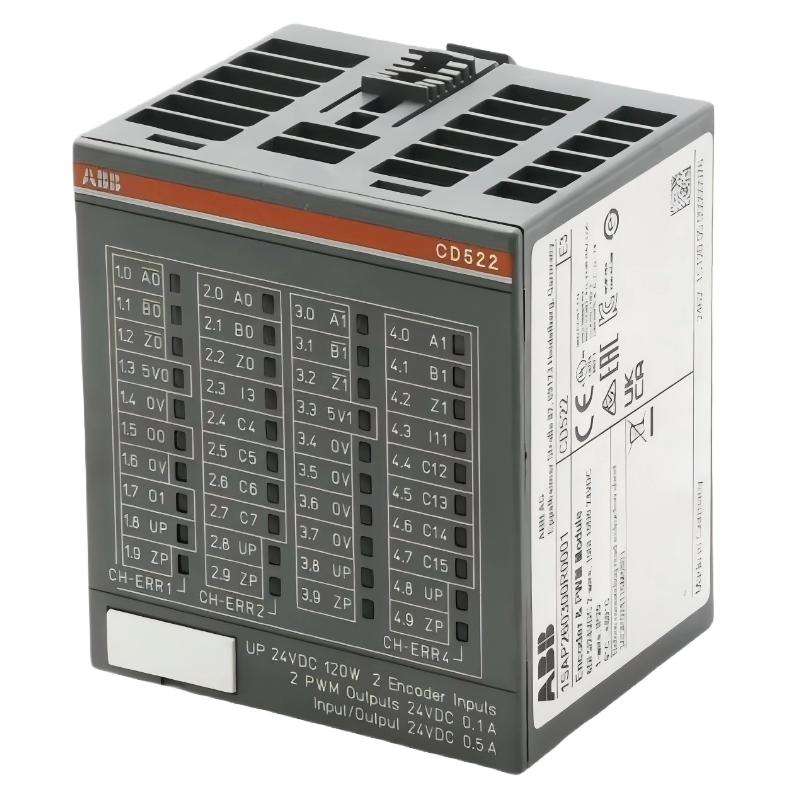
ABB CD522 Encoder Module Troubleshooting: Start with the Signal Path
ABB CD522 encoder module (1SAP260300R0001) troubleshooting should begin with the encoder supply, input signal quality, counter configuration, and PLC data mapping. When a machine reports zero position, incorrect counts, unstable frequency readings, or intermittent encoder signals, the fault may originate in the sensor, wiring, configuration, or module itself. Replacing the PLC hardware before isolating these possibilities can increase downtime without correcting the underlying problem.
The ABB CD522 is an encoder, counter, and PWM module for compatible AC500 automation systems. Its two encoder channels, integrated 5 V supplies, digital I/O, and pulse outputs require different diagnostic approaches depending on the operating mode and application.
ABB CD522 Encoder Fault Diagnosis: Identify the Failure Pattern
Start by recording the exact symptom while the machine is in a safe state. Determine whether the failure affects one encoder channel, both channels, the configurable digital I/O, or the PWM outputs. A fault limited to one channel points toward a different investigation than a module-wide supply or diagnostic error.
- Zero counter value: Check the encoder supply, signal connections, operating mode, and PLC variable mapping.
- Counts change in the wrong direction: Verify incremental encoder phase sequence and the configured counting direction.
- Position jumps unexpectedly: Investigate electrical interference, loose terminals, signal integrity, and incorrect scaling.
- High-speed counting errors: Check the actual input frequency, signal edges, interface compatibility, and cable installation.
- PWM output does not respond: Verify output configuration, command values, load wiring, and the output’s electrical limits.
- Red diagnostic LED: Consult the applicable ABB diagnostic documentation and software status information to identify the reported error.
ABB CD522 PLC Module Troubleshooting: Follow the Evidence
A useful fault diagnosis separates electrical problems from software and mechanical problems. Avoid changing several parameters at once, because doing so makes it difficult to identify which correction resolved the issue.
- Confirm the scope. Determine whether the issue is isolated to encoder channel 0, encoder channel 1, or the entire module.
- Inspect the hardware status. Check the process-voltage indicator, encoder signal LEDs, 5 V supply indicators, and diagnostic LEDs.
- Verify the supply. Measure the encoder supply at the relevant connection under operating conditions and compare it with the encoder datasheet.
- Check signal transitions. Use an appropriate oscilloscope or differential probe to inspect the signals under safe test conditions.
- Review System Configuration. Confirm the selected encoder mode, input assignment, counter parameters, and PLC application mapping.
- Repeat the test. Compare the counter response with a known mechanical movement or a controlled test signal.
Where the fault occurs only at high speed, prioritize signal quality and the applicable frequency limit. Where the fault occurs immediately after startup, inspect configuration, sensor supply, wiring, and module diagnostics first.
Common ABB CD522 Encoder Module Fault Causes
Several recurring fault patterns can produce similar symptoms. The following table links each observation to the next useful diagnostic check.
| Observed condition | Potential cause | Recommended check |
|---|---|---|
| No counts at standstill or during rotation | Incorrect wiring, missing sensor supply, or wrong operating mode | Verify supply voltage, channel terminals, signal LEDs, and configuration |
| Counts are intermittent | Loose connections, interference, or weak signal edges | Inspect the cable, terminals, waveform, and shielding arrangement |
| Position differs from the mechanical reference | Incorrect scaling, counting mode, or missed transitions | Compare a known movement against the configured count resolution |
| Encoder supply is outside specification | Excessive sensor load, wiring fault, or supply damage | Measure at the sensor and verify current demand against the manual |
| Errors occur only at high speed | Frequency limit exceeded or signal integrity degraded | Measure the input waveform and verify the selected mode’s limits |
| PWM output remains inactive | Incorrect output mode, command mapping, or wiring | Check the software command, output indicator, and output circuit |
ABB CD522 Encoder Signal Analysis and Diagnostic Commands
When the encoder signal is present but the PLC count remains unchanged, compare the physical input with the value reported by the application. The following pseudocode illustrates a diagnostic sequence; it is not executable ABB Automation Builder syntax.
IF ModuleDiagnostic <> OK THEN
    RecordDiagnosticStatus();
    CheckModuleAndProcessSupply();
END_IF;

IF EncoderSupplyWithinSpecification = FALSE THEN
    InspectSupplyAndSensorLoad();
ELSIF EncoderSignalDetected = FALSE THEN
    CheckWiringAndSignalInterface();
ELSIF CounterValueUnchanged AND ShaftMoving THEN
    VerifyEncoderModeAndChannelMapping();
ELSE
    CompareCountsWithKnownMechanicalMovement();
END_IF;
Use the actual variable names, diagnostic structures, and programming instructions supported by the target controller. Do not write to hardware outputs or reset counters solely for diagnosis while the machine is operating unless the action is explicitly authorized by the machine’s safety and commissioning procedures.
The CD522 supports applicable encoder and frequency-input modes up to a documented hardware limit of 300 kHz. This is not a universal operating limit for every encoder type or configuration. Check the selected mode and the encoder manufacturer’s specifications before evaluating a high-frequency fault.
ABB CD522 Troubleshooting Case: Incorrect Counts at Higher Speed
Illustrative engineering case: An incremental encoder produces stable counts during slow rotation, but the reported position becomes inconsistent as the conveyor accelerates. The initial assumption is that the CD522 counter is defective. However, the fact that the system works at low speed suggests that the engineer should investigate speed-dependent signal or configuration problems before replacing the module.
The diagnostic process begins with a comparison of actual shaft movement and the PLC count at low and high speeds. The engineer then checks the encoder’s specified output interface, the input frequency, A/B phase signals, cable routing, and signal edges. If the encoder supply remains within specification but the waveform becomes distorted at higher speed, wiring interference or interface incompatibility becomes a stronger candidate than a failed counter.
After correcting the identified issue, repeat the same movement test at several speeds and compare the results with the mechanical reference. Record the measured values before and after the correction. This scenario describes a diagnostic method, not a verified customer incident; no unsupported repair result or performance improvement is claimed.
ABB CD522 Fault Recovery: When to Repair or Replace the Module
Module replacement should be considered only after the external signal path, supply, configuration, and controller diagnostics have been checked. A failed encoder supply indicator or persistent diagnostic error can justify further hardware investigation, but neither observation alone proves that the module has failed.
- Correct loose terminals and wiring errors only after isolating the relevant power sources.
- Replace damaged cables or incompatible sensors with components that meet the required interface specifications.
- Correct the configured encoder mode and I/O mapping, then retest using a controlled movement.
- Investigate a suspected internal fault using the manufacturer’s diagnostic procedure.
- Replace the module if a hardware fault is confirmed and the approved repair process requires replacement.
Before removing the module, document the hardware order code, project version, firmware, parameter settings, and diagnostic messages. Isolate power and follow the applicable ESD and cabinet safety procedures. After replacement, verify the terminal connections and configuration before restoring normal machine operation.
ABB CD522 Encoder Module Troubleshooting FAQ
Why does the ABB CD522 counter remain at zero?
Check the encoder supply, physical signal connections, selected operating mode, channel assignment, and PLC variable mapping. Confirm that the encoder is producing a compatible signal before concluding that the module is defective.
What causes unstable encoder readings on the ABB CD522?
Potential causes include electrical interference, loose terminals, unsuitable cable routing, incorrect signal interfacing, and configuration errors. Compare the physical waveform with the PLC count to narrow down the fault.
How can the CD522 encoder input be tested safely?
Follow the machine’s isolation and commissioning procedures. Check the supply with a suitable meter and inspect signal transitions with test equipment rated for the interface. Use a controlled movement or approved test signal to verify counting behavior.
Does an illuminated red LED always indicate a failed CD522 module?
No. The LED indicates a diagnostic condition that must be interpreted using the applicable ABB documentation and software diagnostics. Identify the reported error before deciding whether the module requires replacement.
Can encoder interference cause faults only at high speed?
Yes. Signal distortion, insufficient edge quality, cable coupling, and frequency-related limitations may become more apparent as the pulse rate increases. Verify the waveform and operating-mode limits under representative conditions.
Should the ABB CD522 be replaced when only one encoder channel fails?
Not immediately. Check the affected sensor, supply, terminals, signal interface, configuration, and diagnostic status first. If the external causes are eliminated and the hardware fault is confirmed, follow ABB’s approved replacement procedure.
ABB CD522 Fault Diagnosis: Final Engineering Assessment
Effective ABB CD522 Troubleshooting depends on identifying where the signal chain fails: the encoder, its power supply, the wiring, the module input, the configuration, or the PLC application. Compare measured electrical signals with actual counter values, and change one variable at a time so the result remains meaningful.
For repeatable Fault Diagnosis, record the operating mode, encoder interface, measured supply voltage, input frequency, diagnostic messages, and test conditions. Use the current ABB hardware manual for electrical limits and connection details. A disciplined evidence-based approach helps distinguish a correctable installation problem from a genuine module failure and supports a more reliable return to service.



