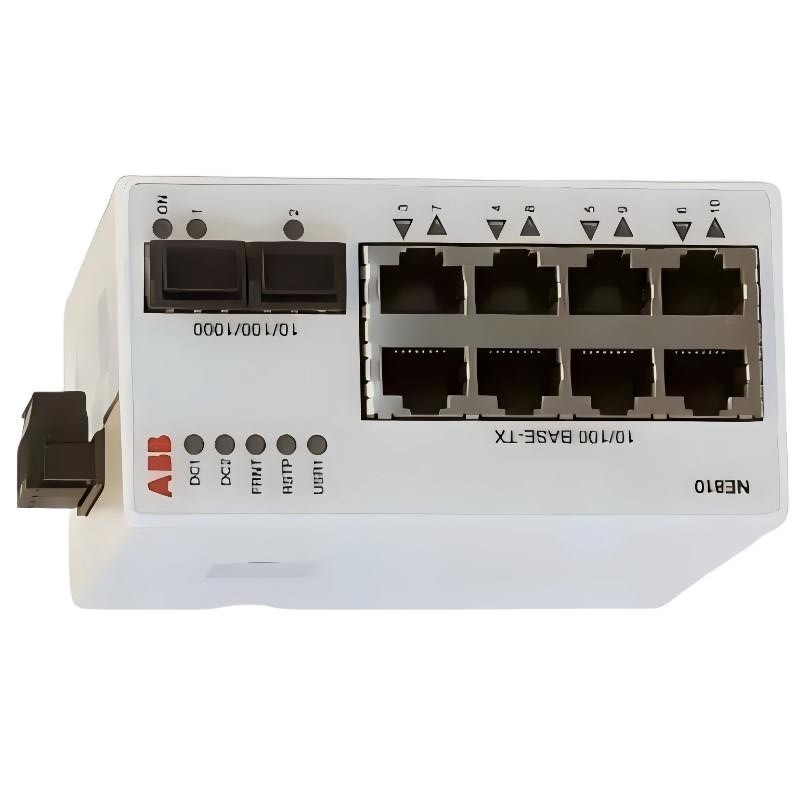
ABB NE810 3BSE080207R1 Industrial Ethernet Switch Troubleshooting Guide
ABB NE810 3BSE080207R1 Industrial Ethernet Switch communication faults are often associated with physical link problems, incorrect SFP selection, unstable DC power, or network redundancy configuration errors. When a PLC Controller or System 800xA workstation loses communication, engineers should investigate the Ethernet path systematically before concluding that the NE810 hardware has failed. Effective Fault Diagnosis requires separating power-related symptoms, interface problems, and network topology issues.
Contents of the ABB NE810 Troubleshooting Guide
- Recognizing Network Failure Patterns
- Industrial Ethernet Fault Diagnosis Logic
- Power Supply Fault Investigation
- RJ45 and SFP Communication Problems
- FRNT Redundancy and Network Loop Issues
- Field Investigation Example
- ABB NE810 Repair and Recovery Procedures
- Technical Troubleshooting FAQ
- Fault Diagnosis Summary
ABB NE810 Industrial Ethernet Switch Common Fault Symptoms
Network failures involving the NE810 do not always produce a complete switch shutdown. Some faults affect only one Ethernet interface, while others interrupt communication between multiple automation devices.
Engineers should distinguish the following symptoms:
- Complete communication loss: Multiple connected PLC Controllers or workstations become unreachable.
- Single-port communication failure: One connected device loses its Ethernet connection while other ports remain operational.
- Intermittent communication: Devices repeatedly disconnect and reconnect without a consistent shutdown.
- Optical link failure: An SFP connection fails to establish or becomes unstable.
- Redundancy switching problems: Network communication is interrupted during a topology change.
- Management access failure: The switch cannot be accessed through the expected management connection.
These symptoms should not be treated as interchangeable. A single failed RJ45 cable does not indicate the same root cause as simultaneous communication loss across several network segments.
ABB NE810 Industrial Ethernet Fault Diagnosis Logic
A reliable Troubleshooting process begins by identifying the scope of the communication failure. Engineers should determine whether the problem affects one device, one network branch, or the complete Ethernet infrastructure.
The recommended diagnostic logic is based on three questions:
Is the NE810 Receiving Stable Power?
Check the DC supply voltage at the actual equipment terminals. The NE810 operates within a 19–60 VDC input range. If the voltage falls outside this range, investigate the power source, wiring, protective devices, and terminal connections.
Is the Physical Ethernet Connection Working?
Inspect the affected RJ45 or SFP interface. Check link indicators, cable continuity, connector condition, transceiver compatibility, and remote device status.
Is the Network Topology Operating Correctly?
If the physical connections are healthy, review network configuration, FRNT behavior, port assignments, and possible Ethernet loops. Compare the current configuration with the approved System Configuration documentation.
ABB NE810 Power Supply Fault Investigation
Power-related problems can produce misleading communication symptoms. A switch may restart intermittently, lose selected connections, or become completely inaccessible when its DC supply is unstable.
The NE810 supports redundant 19–60 VDC power input. Its rated current is 240 mA at 24 VDC and 120 mA at 48 VDC.
During power Fault Diagnosis, check the following:
- Measure the supply voltage at the switch terminals.
- Inspect both power input paths where redundancy is installed.
- Check for loose or oxidized terminal connections.
- Inspect DC power distribution fuses and circuit protection devices.
- Check whether other equipment connected to the same supply experiences similar symptoms.
- Review power supply event records if available.
Intermittent Power Fault Identification
Consider a diagnostic example in which the nominal supply is 24 VDC, but the measured voltage drops to 18.5 VDC during a cabinet load change. This reading falls below the NE810’s specified operating voltage range.
The correct investigation is to examine the upstream power supply, distribution wiring, load conditions, and voltage drop. Replacing the Ethernet switch without correcting the unstable power source is unlikely to provide a permanent solution.
ABB NE810 RJ45 and SFP Communication Troubleshooting
Interface-related communication problems are particularly important in industrial Ethernet networks because different physical interfaces require different diagnostic methods.
RJ45 Ethernet Port Fault Diagnosis
If a PLC Controller connected to one RJ45 port becomes unreachable, begin with the physical connection rather than immediately changing network parameters.
Inspect:
- Ethernet cable damage and connector locking.
- Correct port assignment at both ends.
- Remote device power and interface status.
- Link speed and duplex compatibility.
- Evidence of intermittent link loss.
- Port configuration and network segmentation.
A useful test is to replace the suspected patch cable with a verified cable while keeping the same switch port and remote device. If communication returns, the cable or its connectors become the primary suspects.
SFP Optical Communication Fault Diagnosis
The NE810 has two SFP interfaces supporting 10/100/1000 Mbit/s connections. Incorrect optical component matching can prevent the link from establishing even when both devices appear to be operating normally.
Check the following parameters:
- Multimode versus single-mode fiber.
- Transmitter and receiver wavelength.
- BiDi transmitter and receiver pairing.
- Optical transmission distance.
- Connector contamination or physical damage.
- Optical signal level against the transceiver specifications.
For example, a BiDi connection requires correctly matched transmitting and receiving wavelengths at the two endpoints. Installing two identical transceivers where complementary models are required can result in a failed optical link.
ABB NE810 FRNT Redundancy and Network Loop Troubleshooting
FRNT is an important feature of the NE810 network architecture. When communication is interrupted during redundancy switching, engineers should investigate the topology and configuration before replacing hardware.
Potential causes include:
- Incorrect physical ring connections.
- Inconsistent redundancy configuration.
- Unexpected changes to network cabling.
- Incompatible redundancy mechanisms on connected equipment.
- Incorrect port assignments.
- Uncontrolled Ethernet loops.
Start by reviewing the network diagram and identifying the intended redundancy path. Compare the actual cable connections with the approved design. Then examine available switch diagnostics and event records to determine whether topology changes correspond to the communication interruptions.
Network Loop Investigation
A network loop can cause excessive broadcast traffic and unstable communication when the topology is not correctly controlled. Symptoms may include delayed responses, intermittent PLC communication, and multiple devices becoming unreachable.
Do not disconnect random network cables during live production. Isolate and test network segments according to the site’s approved maintenance and redundancy procedures.
ABB NE810 Industrial Ethernet Switch Field Investigation Example
Consider an illustrative industrial automation maintenance scenario involving an ABB System 800xA network. One remote controller intermittently loses communication, while the operator workstation and other network devices remain accessible.
The initial assumption might be a controller communication fault. However, the engineering investigation should avoid replacing the controller before examining the complete communication path.
Initial Observation and Signal Analysis
The maintenance engineer records the following hypothetical observations:
- NE810 DC supply measurement: 24.1 VDC.
- Other connected Ethernet devices: Communication normal.
- Remote controller: Intermittent communication loss.
- Optical interface: Link instability reported during inspection.
- Network configuration: No documented recent changes.
Root Cause Investigation
Since the power measurement is within the specified operating range and other network branches remain operational, the investigation moves toward the affected optical connection.
The engineer checks the SFP model, fiber type, wavelength pairing, and connector condition. A connector inspection then identifies contamination on the optical interface.
This is a representative diagnostic scenario, not a verified customer incident or a published ABB failure report. The measurements are illustrative and should not be interpreted as actual recorded NE810 service data.
Corrective Action and Recovery Verification
Following the site’s approved optical maintenance procedure, the affected connection is inspected and cleaned using suitable fiber-optic cleaning equipment. The link is then re-established and monitored.
Communication recovery should be confirmed through:
- Stable optical link status.
- Consistent communication with the remote controller.
- Normal network monitoring results.
- No repeated link-down events.
- Successful verification of the intended redundancy path.
The important engineering lesson is that a communication fault does not automatically indicate a defective switch. Physical interface inspection can prevent unnecessary replacement of otherwise functional network equipment.
ABB NE810 Repair and Network Recovery Procedures
Repair decisions should be based on confirmed fault evidence. The NE810 is an industrial managed Ethernet switch, so troubleshooting should prioritize external power, cabling, transceivers, configuration, and network topology before considering internal hardware failure.
The following recovery actions can be used according to the confirmed fault:
When Power Supply Problems Are Confirmed
- Correct the upstream DC supply problem.
- Repair defective power distribution wiring.
- Replace damaged terminals or protective components where authorized.
- Verify redundant supply operation.
- Record voltage measurements after restoration.
When Ethernet Interface Problems Are Confirmed
- Replace damaged Ethernet patch cables.
- Correct port allocation errors.
- Clean optical connectors using approved equipment.
- Install compatible SFP transceivers.
- Verify the remote interface and link parameters.
When Configuration Problems Are Confirmed
- Compare the current configuration with the approved backup.
- Review port assignments and redundancy settings.
- Correct documented configuration inconsistencies.
- Check the management access path.
- Validate network stability after each authorized change.
When Hardware Failure Is Suspected
If power, cabling, transceivers, and network configuration have been verified but the switch continues to exhibit abnormal behavior, inspect the unit for physical damage and abnormal operating conditions.
Do not perform component-level PCB repair or unauthorized firmware modification on a production network switch. If internal failure is suspected, follow ABB service guidance or replace the unit with an approved compatible device. Confirm firmware, configuration, and network compatibility before returning replacement hardware to service.
ABB NE810 Troubleshooting Diagnostic Reference
The following pseudocode represents a maintenance checklist and is not an executable NE810 command interface.
DEVICE = ABB_NE810
ARTICLE = 3BSE080207R1

IF POWER_VOLTAGE < 19V OR POWER_VOLTAGE > 60V:
    INVESTIGATE_DC_SUPPLY

IF RJ45_LINK_DOWN:
    CHECK_CABLE
    CHECK_REMOTE_DEVICE
    CHECK_PORT_CONFIGURATION

IF SFP_LINK_DOWN:
    CHECK_TRANSCEIVER
    CHECK_WAVELENGTH
    CHECK_FIBER_TYPE
    INSPECT_OPTICAL_CONNECTORS

IF MULTIPLE_DEVICES_DISCONNECTED:
    CHECK_POWER
    CHECK_NETWORK_TOPOLOGY
    CHECK_FRNT_STATUS

IF FAULT_REMAINS:
    REVIEW_DIAGNOSTIC_RECORDS
    CONTACT_AUTHORIZED_SERVICE
ABB NE810 3BSE080207R1 Technical Troubleshooting FAQ
Why does the ABB NE810 lose communication intermittently?
Intermittent communication can result from unstable DC power, damaged Ethernet cables, poor optical connections, incompatible SFP transceivers, or network redundancy problems. Identify whether the fault affects one interface or multiple network segments before selecting a corrective action.
What causes an ABB NE810 SFP port to show no network link?
Common causes include incorrect fiber type, mismatched wavelengths, incompatible transceiver models, contaminated connectors, reversed fiber connections, and excessive optical attenuation. Verify both endpoints before replacing the switch.
Can an unstable 24 VDC supply cause NE810 communication failures?
Yes. The NE810 requires an operating voltage between 19 and 60 VDC. Voltage drops below the specified range can cause abnormal operation or interruptions. Measure voltage directly at the device terminals during the reported fault.
What should be checked when all connected devices lose communication?
Start with the switch power supply and common network connections. Then investigate the network topology, upstream communication path, and redundancy status. Multiple simultaneous failures suggest a common network or power problem rather than several independent device failures.
Does the ABB NE810 support FRNT network redundancy?
Yes. The NE810 supports FRNT for fast network topology reconfiguration. The actual recovery behavior depends on the complete network design and correct configuration of the connected equipment.
Can an incorrect SFP transceiver cause intermittent Ethernet communication?
Yes. An incompatible optical transceiver or incorrect wavelength pairing can cause unstable links or prevent communication entirely. Check the exact SFP specifications and the optical interface at the remote endpoint.
How can engineers distinguish an NE810 hardware fault from a cable fault?
Inspect the physical connection, test with a verified compatible cable or transceiver, and compare the affected interface with other working interfaces. If the problem follows the cable or transceiver, the external connection is the likely cause. If it remains associated with the same switch interface after controlled testing, further hardware investigation may be necessary.
When should the ABB NE810 industrial switch be replaced?
Replacement should be considered when a persistent hardware fault is supported by diagnostic evidence and external power, cabling, transceivers, and configuration issues have been excluded. Verify the replacement model, article number, firmware compatibility, and approved network configuration before installation.
ABB NE810 Fault Diagnosis and Troubleshooting Summary
Effective ABB NE810 3BSE080207R1 Troubleshooting depends on identifying the actual failure point rather than replacing hardware based on communication symptoms alone. Engineers should investigate DC power stability, RJ45 connections, SFP compatibility, optical signal conditions, and FRNT network behavior in a structured sequence.
For long-term industrial network reliability, maintain accurate System Configuration records, document all corrective actions, and verify communication recovery under normal operating conditions. A disciplined Fault Diagnosis process helps reduce unnecessary equipment replacement, minimize PLC Controller communication interruptions, and maintain the availability of ABB industrial automation networks.