100% Original, Ready to Ship!

ABB PM591 1SAP150100R0100 CPU Board Troubleshooting Guide
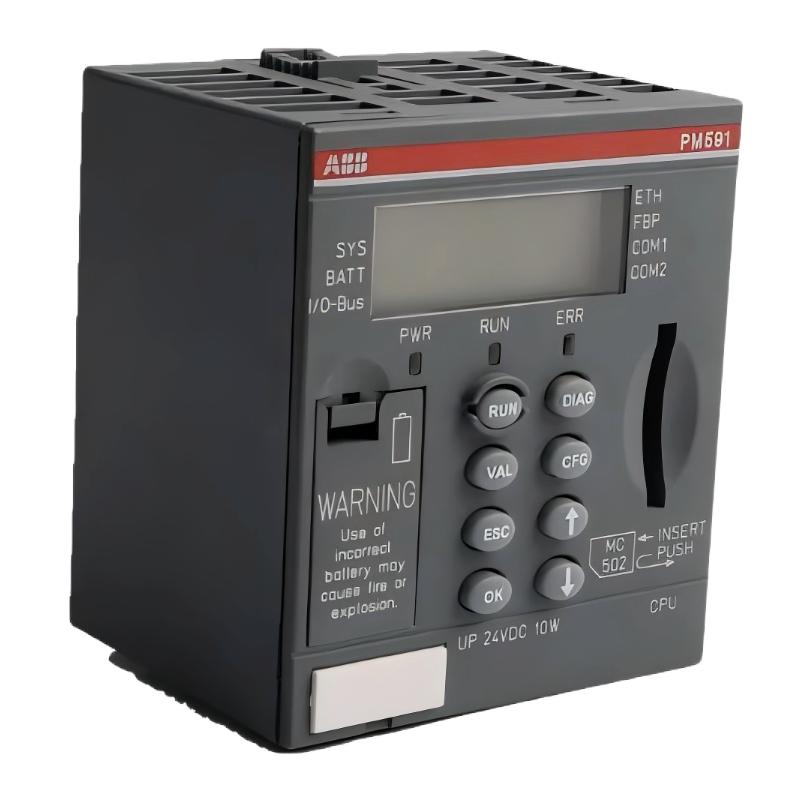
ABB PM591 1SAP150100R0100 CPU Board faults should be diagnosed by separating power, hardware recognition, application startup, and communication problems before replacing the PLC Controller. On the AC500 platform, an illuminated display does not by itself prove that the application is running correctly, while a failed programming connection does not automatically indicate a defective CPU.
ABB PM591 CPU Board Troubleshooting: Diagnostic Contents
- PM591 CPU fault symptoms
- Fault Diagnosis and investigation logic
- 24 V DC supply and startup faults
- RS-232/485 communication Troubleshooting
- Application and configuration recovery
- Illustrative field investigation
- Frequently asked questions
- Fault recovery conclusion
ABB PM591 1SAP150100R0100 CPU Board Fault Symptoms
Fault symptoms on the PM591 can include an unexpected CPU restart, an abnormal display indication, failure to establish an engineering connection, missing field-device responses, or an application that does not enter the expected operating state. Each symptom points to a different diagnostic path.
- No apparent startup: Investigate the supply, wiring, terminal-base contacts, and hardware condition.
- CPU display active but application unavailable: Inspect startup status, diagnostic codes, application loading, and operating mode.
- Programming connection fails: Check the selected serial port, cable, interface configuration, and software compatibility.
- Intermittent communication: Examine grounding, shielding, cable routing, termination where required, and serial parameters.
- Unexpected machine behavior: Review application logic, I/O status, interlocks, communication timeouts, and recent configuration changes.
ABB PM591 CPU Fault Diagnosis: Establish the Evidence First
A useful Fault Diagnosis process starts by documenting what changed immediately before the failure. Recent maintenance, a replacement CPU, altered communication wiring, a power disturbance, or a new project download can provide stronger evidence than the symptom alone.
Record the complete CPU order number, display code, LED states, application mode, supply measurements, engineering software messages, and affected communication devices. Compare these observations with the manufacturer’s diagnostic documentation.
- Determine whether the fault affects the CPU itself, the application, one interface, or multiple connected devices.
- Check whether the problem is continuous, intermittent, or associated with a specific operating event.
- Compare actual measurements with the specified limits instead of relying on nominal values alone.
- Change one variable at a time and repeat the same test after each corrective action.
- Consider CPU replacement only after external causes and configuration errors have been reasonably excluded.
ABB PM591 CPU Startup Faults: 24 V DC Supply Checks
Power-related faults can appear as failed startup, repeated resets, or unstable communication. A voltage reading taken at the power supply terminals may not reveal a loose connection or voltage drop at the controller itself.
With the appropriate electrical precautions, measure the supply at the approved point near the controller and compare the result with the specified input range. If possible, observe the voltage during startup and when other cabinet loads switch on.
- Inspect protective devices, terminal tightness, polarity, and cable condition.
- Check whether other equipment shares the supply and introduces transient loading or electrical noise.
- Inspect the terminal base and mating contacts for heat discoloration or mechanical damage.
- Correlate any restart with power measurements and recorded diagnostic events.
Do not use an assumed voltage threshold as proof of failure. The correct acceptance limits must come from the documentation for the exact PM591 hardware version.
ABB PM591 RS-232/485 Communication Troubleshooting
The PM591 1SAP150100R0100 provides two RS-232/485 serial interfaces. When communication fails, first establish which physical port and electrical interface the application actually uses. RS-232 and RS-485 have different wiring requirements and should not be treated as interchangeable connection schemes.
For an RS-485 network, inspect the differential pair, polarity, cable routing, common reference arrangements where required, and termination and biasing according to the network design. For RS-232, verify the correct cable wiring and connector pinout. In both cases, confirm baud rate, parity, data format, station address, and protocol configuration.
Diagnostic pseudocode — not an ABB command:

IF CPU supply is outside specification:
    Investigate supply, wiring, and terminal-base connections
ELSE IF CPU startup diagnostics indicate a fault:
    Record the code and consult the hardware manual
ELSE IF local engineering communication fails:
    Verify port, cable, interface, and software configuration
ELSE IF only one field device is offline:
    Check that device's wiring, address, and protocol settings
ELSE:
    Review application logic and system-level diagnostics
Where possible, test with an approved known-good cable or isolated test device. Avoid changing several serial parameters simultaneously, because doing so makes the original cause harder to identify.
ABB PM591 PLC Application and System Configuration Recovery
If the CPU powers up but the machine does not operate as expected, determine whether the correct application is loaded and whether the controller has entered the intended mode. Review the engineering software diagnostics and compare the current configuration with the last approved project.
- Confirm the configured CPU model matches the installed 1SAP150100R0100.
- Check project version, software compatibility, and any configuration changes made before the incident.
- Review application startup conditions, I/O mapping, communication timeouts, and interlocks.
- Verify memory-card contents and backup availability before attempting a restore.
- Compare online values with expected process conditions using a controlled, documented test.
Do not download an unverified project or initialize retained data as a first-line repair. Either action may change machine behavior or remove information needed for recovery. Follow the site’s change-control and backup procedures.
ABB PM591 CPU Board Troubleshooting: Illustrative Field Investigation
Reported symptom in this hypothetical scenario: An AC500 PLC remains powered, but a supervisory workstation intermittently loses communication with the controller.
The engineer first checks whether the CPU records a restart or hardware diagnostic. No corresponding event is identified. The next investigation compares communication settings at both ends and inspects the serial cable route. A cable segment is found running alongside a source of electrical interference, and the network termination arrangement does not match the installation drawing.
After the cable route and termination are corrected according to the approved design, the engineer repeats the communication test under the same operating conditions and records the error count and connection stability. If the fault persists, the next checks include grounding, device addressing, interface configuration, and the connected equipment.
This is an illustrative engineering case, not a verified customer incident. No measured improvement or repair outcome is claimed. For a real service report, include the measured values, duration of testing, error counts, and confirmed root cause.
ABB PM591 CPU Board Repair and Troubleshooting: Frequently Asked Questions
Does an active display mean the PM591 CPU is healthy?
No. The display is one diagnostic indicator, not a complete functional test. Check the documented status codes, application state, communication diagnostics, and controller behavior before concluding that the CPU is operating correctly.
Should the CPU be replaced if the programming connection fails?
Not immediately. Verify the selected interface, cable, wiring, port settings, software compatibility, and terminal-base connections first. A communication fault can originate outside the CPU.
Can a PM591 application be restored from a memory card?
Recovery depends on the card contents, application backup method, hardware configuration, and applicable firmware and software requirements. Verify the approved recovery procedure before loading or initializing data.
When is professional CPU board repair necessary?
Specialist assessment may be appropriate when physical damage, repeated hardware diagnostics, or a persistent fault remains after supply, connection, configuration, and external-device checks. Follow the manufacturer’s service guidance and the site’s maintenance requirements.
ABB PM591 1SAP150100R0100 CPU Board Fault Diagnosis: Conclusion
Effective ABB PM591 Troubleshooting depends on evidence-based isolation of power, hardware, application, and communication faults. Confirm the exact CPU variant, inspect the terminal-base connection, measure the supply against the specified limits, and use documented diagnostics before changing the application or replacing hardware. A successful repair should be demonstrated by repeatable functional tests, stable communication, correct PLC behavior, and a service record that identifies the verified cause and corrective action.
 ABB SS110 3BSE007698R1 Voting Unit Troubleshooting Guide
 ABB DX522 1SAP245200R0001 Digital I/O Module Troubleshooting Guide
 ABB SD823 3BSC610039R1 Power Supply Troubleshooting Guide
 ABB DI685 3BDS005833R1 Digital Input Module Troubleshooting Guide