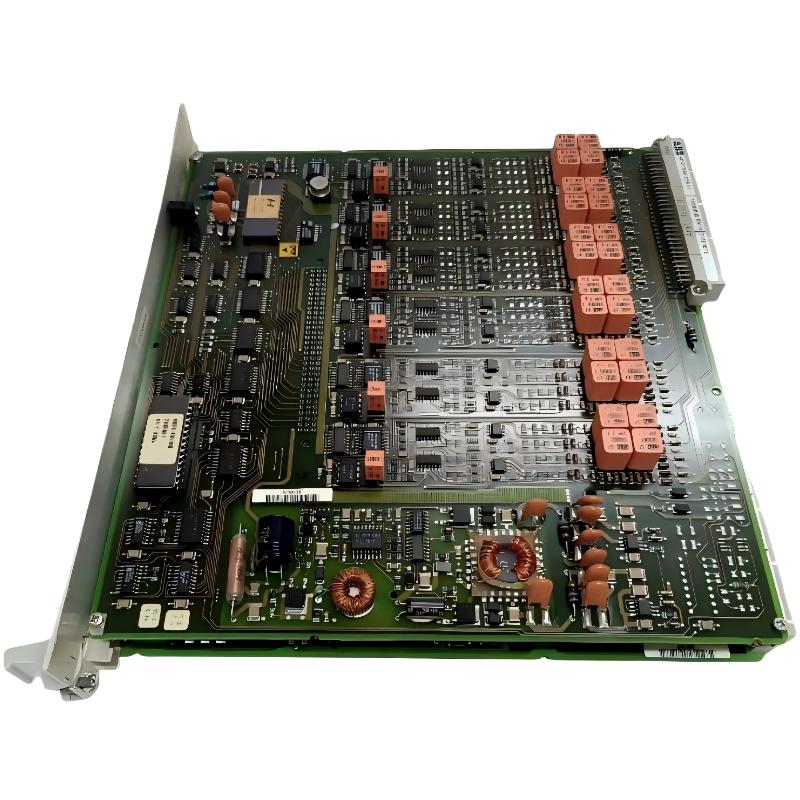
ABB 216EA61b HESG324015R1 Input Module installation requires correct wiring, signal verification, and system configuration before commissioning. In industrial protection and automation systems, most commissioning failures are caused by incorrect channel mapping, unstable auxiliary power, or improper field signal connection rather than a defective module. The 216EA61b is designed as an analogue input unit within ABB control and protection systems, receiving measured variables and converting analogue signals into digital data for system processing.
This Installation Guide focuses on practical field procedures for ABB 216EA61b HESG324015R1 Input Module setup, wiring inspection, and commissioning validation.
ABB 216EA61b Input Module Installation Guide Contents
- Installation Preparation and Hardware Inspection
- ABB 216EA61b Wiring and Signal Connection
- System Configuration and Parameter Setup
- Commissioning Verification Procedure
- Real Field Commissioning Case
- Frequently Asked Questions
ABB 216EA61b HESG324015R1 Input Module Installation Preparation
Before installing the PLC Controller or protection system module, engineers should verify the complete hardware chain, including power supply, rack position, communication bus, and connected measuring devices.
- Confirm ABB 216EA61b HESG324015R1 model identification.
- Check module connectors for oxidation or mechanical damage.
- Verify auxiliary DC supply stability.
- Confirm analogue input transformer or field sensor compatibility.
- Record original system configuration before replacement.
A common field mistake is replacing an input module without checking signal quality. A damaged sensor cable can create the same symptom as a failed Input Module.
ABB 216EA61b Input Module Wiring and Field Signal Connection
The ABB 216EA61b Input Module receives analogue measurement signals and transfers processed data through the internal control bus. Correct channel identification is critical because incorrect wiring can create abnormal measurements without generating hardware alarms.
- Inspect analogue signal polarity.
- Separate measurement cables from high-power cables.
- Check shielding connection at the recommended grounding point.
- Verify channel numbering before energizing the system.
Check Procedure:

Measure DC Supply:
24VDC input = OK

Signal Verification:
CH01 = Expected analogue value
CH02 = Expected analogue value

Bus Status:
Communication = Active
Alarm LED = OFF
ABB 216EA61b PLC Controller System Configuration Setup
After mechanical installation, the ABB 216EA61b HESG324015R1 must be integrated into the existing System Configuration. Engineers should confirm addressing, channel allocation, and measurement scaling.
- Verify module address allocation.
- Confirm analogue channel assignment.
- Check engineering unit scaling.
- Compare field value with DCS display value.
ABB 216EA61b Setup and Commissioning Validation
During commissioning, engineers should not only check whether the module communicates but also confirm measurement accuracy.
Recommended validation points:
- Apply known input signal.
- Compare field measurement with software value.
- Check alarm response.
- Record commissioning data.
ABB 216EA61b HESG324015R1 Installation Real Case Analysis
In one commissioning case, an ABB 216EA61b Input Module showed unstable analogue readings after replacement. The first assumption was module failure. However, during Fault Diagnosis, the engineering team measured the field signal and found a grounding issue.
The input signal fluctuated between 18.2 mA and 20.1 mA while the transmitter output was stable at 18.5 mA. After correcting cable shielding and grounding, the deviation reduced to less than 0.2%.
This case shows why ABB Input Module commissioning requires signal analysis instead of immediate hardware replacement.
ABB 216EA61b Input Module FAQ
What should be checked before ABB 216EA61b commissioning?
Engineers should check power supply voltage, wiring condition, channel assignment, and communication status before starting commissioning.
Why does ABB 216EA61b show incorrect analogue values?
Incorrect scaling, poor grounding, damaged signal cables, and wrong channel mapping are common causes.
Can ABB 216EA61b be replaced without configuration backup?
Replacement is possible, but keeping the original System Configuration reduces commissioning time and avoids parameter errors.
ABB 216EA61b HESG324015R1 Input Module Installation Summary
Successful ABB 216EA61b HESG324015R1 Input Module installation depends on engineering preparation, accurate wiring, correct System Configuration, and measured commissioning results. A practical Installation Guide should focus on field conditions rather than only hardware specifications. Proper signal verification can prevent unnecessary module replacement and improve long-term system reliability.