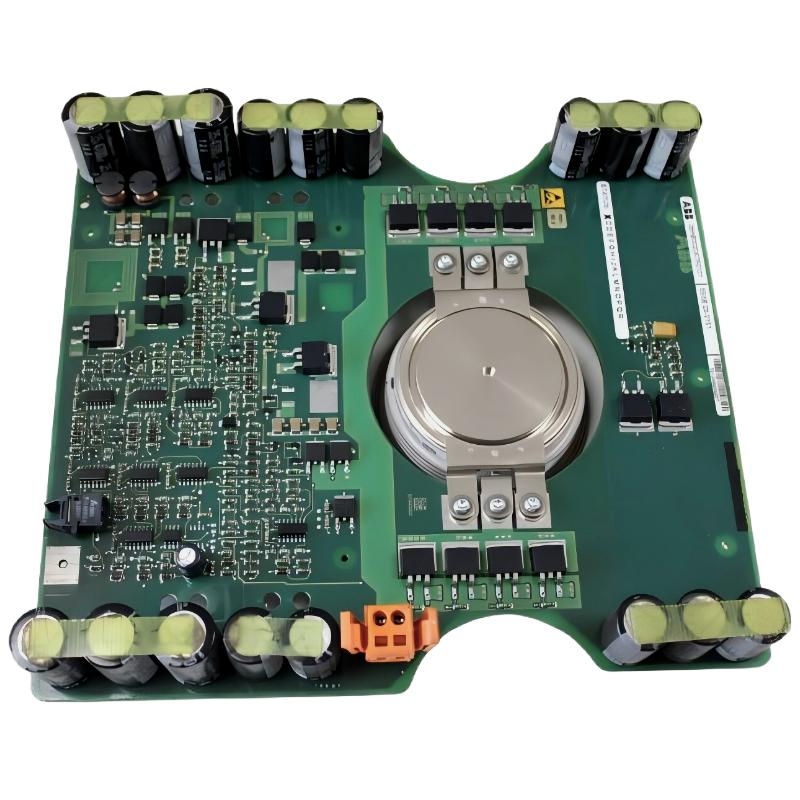
ABB 5SHX0445D0001 IGCT Module Troubleshooting Guide
ABB 5SHX0445D0001 IGCT Module faults should be diagnosed from the complete power-switching circuit rather than from an alarm code alone. Gate-drive problems, abnormal commutation, cooling issues, poor electrical connections, protection trips, and genuine semiconductor damage can produce similar symptoms during converter operation.
ABB 5SHX0445D0001 Fault Pattern Recognition
A useful Troubleshooting process begins with the timing of the fault. An alarm occurring immediately after the enable command suggests a different investigation path from a trip that appears only after several minutes under load.
- Immediate trip: investigate interlocks, gate-drive status, control logic, and protection circuits.
- Trip during switching: investigate gate-drive behavior, commutation, wiring, and power-stage conditions.
- Trip after load increase: investigate current, thermal conditions, cooling, and phase balance.
- Repeated semiconductor failure: investigate the surrounding circuit before installing another IGCT.
This classification prevents a common maintenance error: replacing an expensive power semiconductor before identifying why the original device failed.
ABB 5SHX0445D0001 Fault Diagnosis Method
Fault Diagnosis should follow the energy path from the control command to the power output. Start with what can be safely measured and move toward the semiconductor only when the evidence supports that conclusion.
- Record the exact alarm and operating condition.
- Determine whether the fault occurred at startup, during switching, or under load.
- Compare the affected phase with the healthy phases.
- Check the gate-drive and protection indications.
- Inspect power connections and cooling conditions.
- Perform approved electrical tests after isolation.
- Only then evaluate whether the IGCT itself requires replacement.
ABB 5SHX0445D0001 Electrical Troubleshooting
Electrical Troubleshooting should begin with the simplest measurable difference between a healthy phase and the suspected phase. If two phase legs show similar operating behavior while one phase shows a substantially different current or switching response, that difference is more valuable than a generic “IGCT fault” message.
Inspect:
- Power terminal condition
- Busbar connections
- Insulation condition
- Gate-drive connectors
- Protection feedback
- Phase current balance
- Cooling-system status
Do not use improvised high-voltage testing procedures on the semiconductor. Test methods must match the converter design and the manufacturer’s service documentation.
ABB 5SHX0445D0001 Gate-Drive Fault Diagnosis
Gate-drive faults can resemble an IGCT semiconductor failure because the power device cannot switch correctly when its gate circuit is not operating as intended. Loose connections, damaged gate-drive components, incorrect configuration, or abnormal gate-loop impedance should therefore be considered before condemning the module.
READ ACTIVE FAULT
RECORD FAULT TIMESTAMP
COMPARE HEALTHY / SUSPECT PHASE
CHECK GATE-DRIVE STATUS
CHECK PROTECTION FEEDBACK
CHECK COOLING STATUS
VERIFY SYSTEM CONFIGURATION
PERFORM APPROVED POWER-STAGE TEST
The actual test thresholds and waveform acceptance criteria must come from the applicable ABB converter documentation. Generic voltage limits should not be substituted for equipment-specific values.
ABB 5SHX0445D0001 Thermal Fault Troubleshooting
Thermal investigation is particularly important when the converter runs normally at low load but trips as load increases. In that situation, examine the complete thermal path rather than assuming that the semiconductor has excessive internal losses.
- Check cooling flow or cooling-system status where applicable.
- Inspect the thermal interface.
- Look for contamination or restricted cooling paths.
- Compare temperatures between equivalent power stages.
- Check whether the alarm follows load increase or switching activity.
A temperature trend is often more informative than a single measurement. A rapidly increasing temperature difference between equivalent phases is a reason to investigate mounting, cooling, current imbalance, and switching conditions.
ABB 5SHX0445D0001 IGCT Fault Case Study
In a representative field investigation, a high-power converter repeatedly reported a power-stage fault shortly after load was increased. The first maintenance proposal was to replace the ABB 5SHX0445D0001 IGCT.
The engineering team compared the three phase legs instead. The suspect phase showed a different thermal trend and abnormal switching-related feedback, while the other phases remained stable. The investigation then moved upstream to the gate-drive path and physical connections.
The inspection identified a connection problem in the gate-drive assembly rather than immediately proving semiconductor failure. After the connection was corrected, the converter was returned through controlled Setup and Commissioning checks. The important lesson was that the alarm identified the affected power stage, but it did not by itself identify the failed component.
For this reason, experienced technicians normally compare symptoms across phases and operating conditions before authorizing an IGCT replacement.
ABB 5SHX0445D0001 Repair and Replacement Strategy
When an IGCT is confirmed to be defective, replacement should be treated as a system repair rather than a simple component exchange.
- Secure and discharge the converter according to the approved procedure.
- Document the existing installation.
- Confirm the replacement identification.
- Inspect the mating surfaces and surrounding components.
- Install the replacement using the specified mechanical procedure.
- Reconnect the gate-drive and power interfaces.
- Inspect protection and cooling circuits.
- Perform the approved commissioning sequence.
If the replacement module fails again shortly after installation, stop repeated replacement. A recurring failure normally indicates an unresolved system-level condition such as abnormal switching, cooling problems, electrical stress, gate-drive faults, or another power-stage problem.
ABB 5SHX0445D0001 Troubleshooting FAQ
Does an IGCT alarm always mean that the ABB 5SHX0445D0001 is damaged?
No. The alarm can indicate a problem in the wider gate-drive, protection, cooling, control, or power-stage circuit.
What should be checked before replacing the ABB 5SHX0445D0001?
Check the fault timing, phase behavior, gate-drive status, protection feedback, power connections, cooling condition, and System Configuration before concluding that the semiconductor has failed.
Why is phase comparison useful for ABB 5SHX0445D0001 Fault Diagnosis?
Equivalent phase legs provide a practical reference. Differences in current, temperature, switching response, or protection feedback can help isolate the abnormal section.
Can a visual inspection confirm an IGCT failure?
No. Visual inspection can identify obvious physical damage, but electrical and system-level testing is normally required to establish the actual fault mechanism.
Should an engineer repeatedly restart the converter after an IGCT fault?
No. Repeated energization without understanding the fault can increase equipment risk. The fault should first be documented and investigated using the approved service procedure.
ABB 5SHX0445D0001 Troubleshooting Conclusion and General Overview
Effective ABB 5SHX0445D0001 Troubleshooting depends on distinguishing an IGCT failure from faults in the surrounding power-electronic system. The most useful Fault Diagnosis approach combines alarm timing, phase comparison, gate-drive verification, thermal observation, electrical inspection, and System Configuration checks. When repair is necessary, replacing the module without identifying the original failure mechanism can lead to repeated downtime and another semiconductor failure. A disciplined engineering investigation provides a much stronger basis for reliable repair and recommissioning.